

How strong are your e-commerce ops? Take the 2-min scorecard.
Score Your OpsShopify already manages your orders. Until it doesn't.
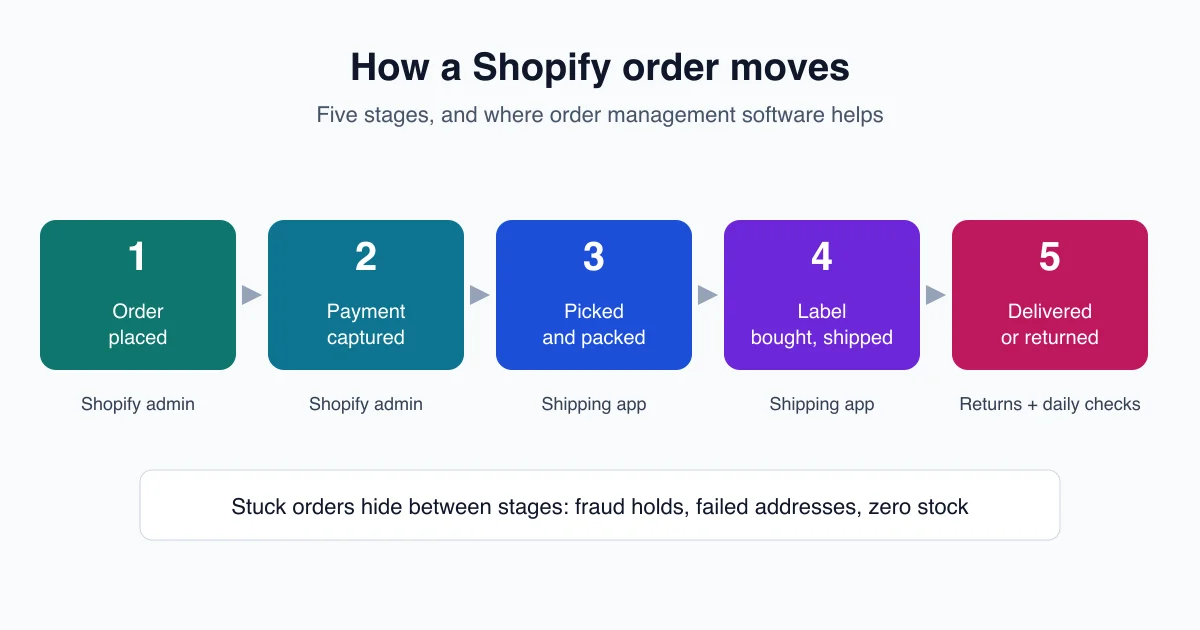
For one store, one warehouse and one person packing boxes, the Shopify admin is enough. Orders arrive, payment is captured, a label is bought, the customer gets a tracking email. Then you add a second sales channel, a part-time packer and a return policy. That is when Shopify order management software stops being optional.
This guide covers what the Shopify admin does on its own, which apps US stores add on top, what they cost in November 2026, and the one gap none of them close. Let's start with the baseline.
What Is Shopify Order Management Software?
Shopify order management software is any tool that captures, routes, fulfills and tracks the orders a Shopify store receives. Shopify's own admin covers the basics: per Shopify's Help Center, most orders move through 2 main stages, capturing payment and fulfilling the order. Apps add shipping, inventory and team controls.
Every Shopify plan includes an Orders page. From it you can search and filter orders, create draft orders for phone or email sales, edit an order after checkout, print packing slips, issue refunds and process returns. Shopify also flags high-risk orders with its built-in fraud analysis.
So the real question is not "do I need order management?" You already have it.
The question is which jobs the admin stops doing well as you grow. In practice there are four:
- Shipping at volume. Buying labels one order at a time works at 10 orders a day. It hurts at 200.
- Inventory across locations and channels. Shopify tracks stock, but syncing it with Amazon, eBay or Walmart orders is a separate job.
- Rules and automation. "If the order is over $500, hold it for review" needs a workflow tool.
- Team accountability. Knowing an order shipped is easy. Knowing someone checked the stuck ones every morning is not.
Each category of Shopify order management software solves one of these jobs. Few solve more than two.
What Can the Shopify Admin Handle Without Extra Apps?
The Shopify admin handles order capture, payment, editing, refunds, returns and fraud review on every plan, and Shopify Flow adds free automation on the Basic, Grow, Advanced and Plus plans. Shopify's pricing page lists Basic at $39 a month, or $29 billed yearly.
Before you buy anything, check what you already pay for. Shopify Flow is the most overlooked part of it.
Flow watches your store for events and runs actions in response, using triggers, conditions and actions. A few order workflows US merchants commonly build:
- Tag every order with a high fraud risk and send it to a "hold" list before fulfillment.
- Add a "VIP" tag when a returning customer's order passes a set value.
- Send a Slack or email alert when an order contains a product that is almost out of stock.
- Cancel and restock orders that stay unpaid past a set time, for payment methods that allow it.
Staff limits matter too. Shopify's pricing page lists up to 5 staff accounts on Grow ($105 a month, or $89 billed yearly), up to 15 on Advanced ($399, or $359 yearly) and unlimited staff on Plus, which starts at $2,300 a month.
There is a second built-in that many stores miss. Shopify's pricing page lists 50 synced marketplace orders per month free on every plan, then 1% of order value up to $99 a month. If your Amazon or eBay volume is small, that may cover your marketplace orders without another subscription.
Here is the catch. The admin and Flow tell you what happened. They do not buy discounted labels in bulk, count stock in a second warehouse, or check that your team followed the morning routine. And that is where most growing stores feel the strain first.
Which Types of Shopify Order Management Software Should You Consider?
US Shopify stores usually stack four layers: the Shopify admin and Flow, a shipping app such as ShipStation, Veeqo or Ordoro, an inventory or order management system once stock spans channels, and an operations layer that checks daily work. ShipStation alone lists plans from $14.99 to $7,499.99 a month on its pricing page.
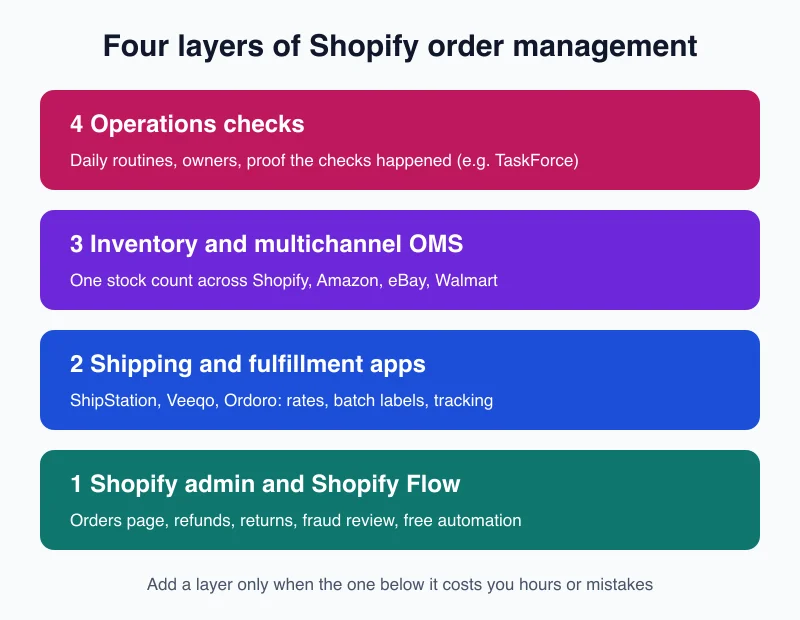
Think of it as layers, not a single purchase. You add a layer when the one below it starts costing you hours or mistakes.
Layer 1: Shopify admin and Flow. Free with your plan. Right for one channel, one location and low daily volume.
Layer 2: Shipping and fulfillment apps. ShipStation, Veeqo and Ordoro pull Shopify orders in, compare carrier rates for USPS, UPS and FedEx, and print labels in batches. This is the first layer most stores buy.
Layer 3: Inventory and multichannel order management. Once you sell on Shopify plus Amazon, eBay, Walmart or wholesale, you need one stock count that updates everywhere. Veeqo's Inventory plan, Ordoro Inventory and dedicated systems such as Linnworks or Cin7 live here.
Layer 4: Operations checks. This layer does not ship anything. It confirms each day that orders are not stuck, stock is right and the team did the routine. Tools in this layer, including TaskForce, sit on top of the other three.
A common mistake is buying a Layer 3 system to fix a Layer 4 problem. A bigger system does not make sure someone looks at it.
How Much Does Shopify Order Management Software Cost in 2026?
Entry pricing runs from free to about $350 a month. Veeqo's shipping plan is free with unlimited orders, ShipStation Starter begins at $14.99 for 50 shipments, and Ordoro's Shipping plans are free, $59 or $149. Inventory tiers jump higher: Ordoro Inventory starts at $349 a month, per each vendor's pricing page in November 2026.
Prices below come straight from each vendor's pricing page, read on November 14, 2026. They are monthly, in US dollars, before any annual discount.
| Tool and plan | Starting price | What the entry tier includes | Source |
|---|---|---|---|
| Shopify Flow | $0 (with any plan) | Order automation with triggers, conditions and actions | Shopify Help Center |
| Veeqo Shipping | $0 | Unlimited orders, users and warehouses; Veeqo earns a commission on labels | Veeqo pricing |
| Ordoro Shipping Essential | $0 | 100 labels a month, 1 sales channel, 1 user | Ordoro pricing |
| ShipStation Starter | $14.99 | 50 shipments a month, 3 users, unlimited store connections | ShipStation pricing |
| Veeqo Inventory | From $19 | Inventory sync, demand forecasting, digital picking; price rises with order volume | Veeqo pricing |
| ShipStation Standard | $29.99 | 50 shipments a month, 10 users, combine and auto-split orders | ShipStation pricing |
| Ordoro Shipping Advanced | $59 | 3,000 labels a month, 5 sales channels, unlimited users | Ordoro pricing |
| Ordoro Shipping Premium | $149 | Unlimited orders and channels, returns management, API access | Ordoro pricing |
| Ordoro Inventory Advanced | $349 | 1,000 orders a month, unlimited warehouses and users | Ordoro pricing |
| ShipStation Premium | $349.99 | 50 shipments a month on the larger-business plan | ShipStation pricing |
| Veeqo High Volume | From $350 | ERP integrations, account manager, priority support | Veeqo pricing |
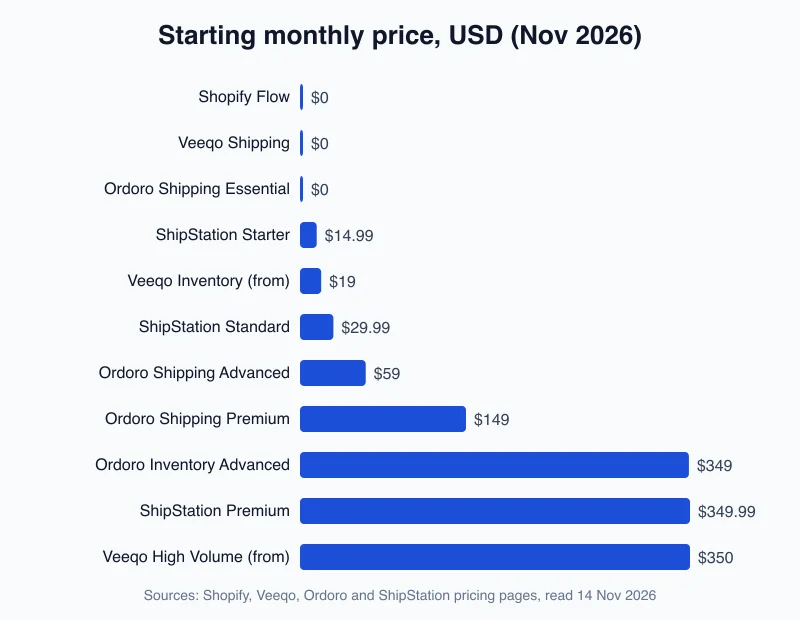
Watch how the price moves, not just where it starts. ShipStation prices by shipments: Standard climbs from $29.99 at 50 shipments to $449.99 at 10,000 a month. Ordoro charges $30 for every 1,000 labels past its Advanced plan's 3,000. Veeqo prices Inventory by order volume.
So a cheap entry tier can become your largest software bill in peak season. Run your December volume through each pricing page, not your March volume.
Is your Shopify store running on checks nobody owns? See where your operations stand with the free TaskForce ops scorecard. A few minutes, a short set of questions, and your results by email.
Which Shopify Order Management Software Fits Your Store?
Choose by your biggest bottleneck. One channel, one location and low volume usually means Shopify plus the free Flow app is enough. Label buying at volume points to ShipStation or Veeqo. Stock spread across channels points to an inventory tier. Ordoro's Shipping Premium plan, at $149 a month, adds unlimited channels and returns management.
Use your daily pain, not a feature list, to decide. Here is how the main options line up.
Stay on Shopify admin and Flow if: you sell on one or two channels, one person packs, and your marketplace volume fits inside Shopify's 50 free synced orders a month. Spend the money on Flow workflows and a written fulfillment routine instead.
Add ShipStation if: label buying is your bottleneck and you want the widest plan ladder. Starter's 3 users suit a small team; Standard raises that to 10 and adds order splitting, warehouse basics and phone support.
Add Veeqo if: you want free shipping software and you ship a lot through Amazon. Veeqo is owned by Amazon, its shipping plan is free with unlimited users, and it makes money on label commissions. Its integrations list Amazon, Shopify, eBay, Walmart and WooCommerce. We cover the trade-offs in our Veeqo alternative guide.
Add Ordoro if: you want US-based support and plan to grow into dropshipping or kitting. Shipping is free to start, but Inventory starts at $349 a month and Dropshipping at $299. Our Ordoro alternative breakdown explains when that total becomes a problem.
Add an inventory or order management system if: the same SKU sells on Shopify, Amazon and a wholesale channel, and overselling is costing you refunds. Our guide to multi-channel order management walks through that setup.
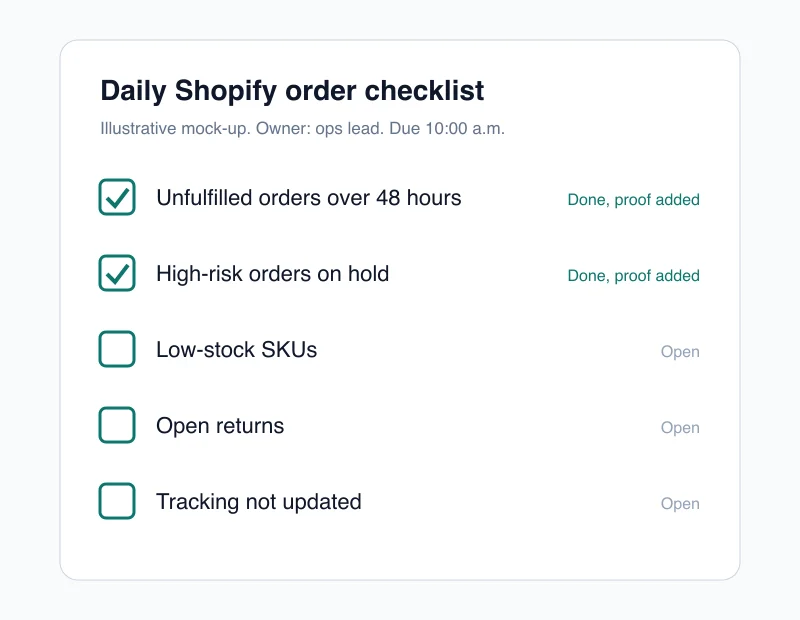
And whichever tool you choose, write down the daily checks before you install it. A tool you never open fixes nothing.
What Order Management Problems Do Apps Not Solve?
Order apps move orders; they do not confirm that people did the daily checks. Shopify's Help Center lists order statuses for payment and fulfillment, but no app forces someone to review unfulfilled or high-risk orders each morning. That gap needs a routine, an owner and proof the work was done.
Picture a made-up but typical Tuesday. ShipStation pulled in 180 orders overnight. 172 shipped. Eight did not: three were held for fraud review, two had an address that failed validation, and three contained a SKU that went to zero stock at 2 a.m.
Every one of those eight sits in a filtered view somewhere. None of them makes noise. The customer finds out first, usually by email, sometimes by chargeback.
This is the job most Shopify order management software leaves to you:
- Unfulfilled orders ageing past your promise. Someone has to look at orders older than 48 hours every day.
- Fraud holds nobody releases. Flow can tag a risky order. It cannot decide to ship it.
- Stock that drifted. A sync error between Shopify and a marketplace shows up as an oversell, not as an alert.
- Returns sitting open. Shopify supports self-serve returns, but someone still has to inspect, restock and refund.
- Routines that depend on one person. When the person who knows the morning routine is off sick, the routine is off too.
That is the layer TaskForce was built for. It connects to Shopify alongside Shopee, Lazada and TikTok Shop, runs six automated audits each day, including stock health, pricing, listing compliance and seller health, and turns daily order checks into checklists where each task carries evidence, such as a photo. It does not print labels or replace ShipStation or Veeqo. It makes sure the work around them happens. See how it fits on the ecommerce operations platform page.
To be honest about fit: TaskForce is built first for teams selling across several channels, especially Southeast Asian marketplaces. A US store selling only on Shopify may get most of the same value from a written checklist and Flow alerts.
How Do You Set Up Shopify Order Management Step by Step?
Set up in four steps: map your current order flow, turn on the free Shopify tools, add one paid app for your biggest bottleneck, then write a daily check routine with an owner. With ShipStation and Ordoro offering 30-day and 15-day free trials, you can test a full peak-week workflow before paying.
Follow this order. Skipping to step 3 is how stores end up paying for three tools that overlap.
Step 1: Map the flow you have today. Write each step from "order placed" to "delivered" and who does it. Mark every step done by memory rather than a system.
Step 2: Turn on what you already pay for. Set up Shopify Flow workflows for fraud holds, low stock and VIP tagging. Check whether your marketplace volume fits in the 50 free synced orders each month.
Step 3: Add one paid tool for the worst bottleneck. If label buying eats the most hours, trial ShipStation (30-day free trial, no credit card) or Ordoro (15-day free trial, no credit card), both per their pricing pages. Veeqo's shipping plan is free to start, so you can run it beside your current setup.
Step 4: Write the daily routine and give it an owner. Five checks, every morning, before 10 a.m.: unfulfilled orders over 48 hours, high-risk holds, failed addresses, low-stock SKUs, and open returns. Our order fulfillment checklist has a full template you can copy.
Then review after your first peak week. Did the tool save hours? Did anything slip through? The answer tells you whether you need another layer, or just better use of the one you have.
Frequently Asked Questions
What is the best Shopify order management software?
There is no single best tool; it depends on your bottleneck. Shopify's admin plus the free Shopify Flow app covers most single-channel stores. ShipStation, which starts at $14.99 a month for 50 shipments, suits stores where label buying is the main job. Multichannel sellers usually need an inventory tier on top.
Does Shopify have built-in order management?
Yes. Every Shopify plan includes an Orders page for capturing payment, editing orders, printing packing slips, issuing refunds, processing returns and reviewing fraud risk. Shopify's Help Center says most orders move through 2 main stages: capturing payment and fulfilling. The free Shopify Flow app adds automation on all four main plans.
Is Shopify Flow free?
Yes. Shopify Flow is a free app available on the Basic, Grow, Advanced and Plus plans, per Shopify's Help Center. Most features work on every plan, but only Grow, Advanced and Plus stores can use the Send HTTP Request action. Usage limits also vary with each plan's API limits.
Is Veeqo really free for Shopify stores?
Veeqo's shipping plan is free with unlimited orders, users and warehouses, according to its pricing page. Veeqo earns a commission on labels bought through it instead of charging a subscription. Inventory features cost extra, starting from $19 a month and rising with order volume, and Veeqo is owned by Amazon.
When should a Shopify store move beyond the native admin?
Most stores move beyond the native admin when they add a second sales channel, a second warehouse or more than a few staff. Shopify's Basic plan suits solo owners, while Grow allows up to 5 staff accounts. Buying labels one at a time for a growing daily volume is another common trigger.
Keep Reading
Find out what your operation is missing
Answer 10 questions. Get your ops score. Takes 2 minutes.
Take the Scorecard