

How strong are your e-commerce ops? Take the 2-min scorecard.
Score Your OpsChoosing a listing tool matters. Sellbrite and Listing Mirror both promise to simplify multi-channel selling, but they approach the problem differently. Sellbrite focuses on ease of use and quick setup for small to mid-size sellers. Listing Mirror targets sellers who need deeper inventory sync and broader marketplace coverage.
This comparison breaks down the actual differences — channel support, pricing models, inventory sync reliability, listing features, and operational capabilities — so you can pick the tool that fits your business instead of the one with better marketing.
Both tools have been on the market for years. Both have loyal user bases. And both have notable gaps that matter more or less depending on where you sell and how complex your operations are.
What Is Sellbrite?
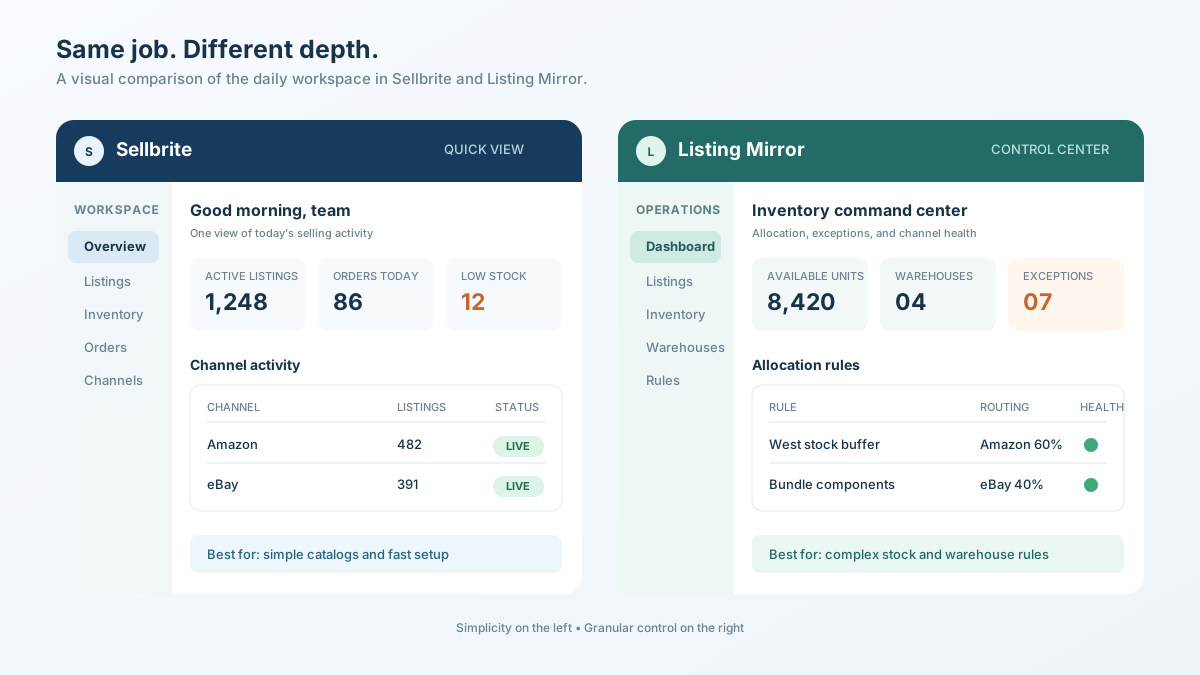
Sellbrite is a multi-channel listing and inventory sync tool designed for small to mid-size ecommerce sellers, now owned by GoDaddy, that connects to major US-focused marketplaces.
Sellbrite launched in 2014 with a simple pitch: list your products on multiple marketplaces from one dashboard. It was acquired by GoDaddy in 2020, which expanded its distribution but also raised questions about product roadmap priority within a larger corporate structure.
The tool connects to Amazon, eBay, Etsy, Walmart, Google Shopping, and Shopify. It provides bulk listing creation, inventory sync across channels, and basic order management. The interface is clean and setup takes less than an hour for most sellers.
Sellbrite's strength is simplicity. If you sell on US-centric marketplaces and need a straightforward way to manage listings and inventory, it gets the job done without a steep learning curve.
Its weakness is depth. Advanced inventory rules, warehouse-level stock allocation, and Southeast Asian marketplace support are missing. As your operations grow more complex, you will hit the tool's ceiling.
What Is Listing Mirror?
Listing Mirror is a multi-channel listing platform built for mid-size to large sellers who need granular inventory control, warehouse management, and broader marketplace integrations.
Listing Mirror positions itself as a more powerful alternative to tools like Sellbrite. It supports Amazon, eBay, Etsy, Walmart, Shopify, BigCommerce, and several niche marketplaces. The platform offers multi-warehouse inventory management, formula-based pricing rules, and more granular listing customization.
The tool was founded to solve a specific pain: sellers with complex inventory needs — multiple warehouses, kitting, bundling, and channel-specific pricing — could not get what they needed from simpler tools.
Listing Mirror's strength is inventory depth. Multi-warehouse support, safety stock buffers, and formula-based inventory allocation give sellers granular control over stock distribution across channels.
Its weakness is UX complexity. The learning curve is steeper than Sellbrite. Setup takes longer. The interface prioritizes power over simplicity, which means smaller sellers may find it overwhelming.
How Do Their Channel Integrations Compare?
Sellbrite covers the major US marketplaces well but lacks Southeast Asian support. Listing Mirror offers broader marketplace coverage including some niche channels.
| Channel | Sellbrite | Listing Mirror |
|---|---|---|
| Amazon (US, CA, MX) | Yes | Yes |
| eBay | Yes | Yes |
| Etsy | Yes | Yes |
| Walmart | Yes | Yes |
| Shopify | Yes | Yes |
| BigCommerce | No | Yes |
| Google Shopping | Yes | No |
| Newegg | No | Yes |
| Overstock | No | Yes |
| Shopee | No | No |
| Lazada | No | No |
| TikTok Shop | No | No |
The gap that matters for SEA sellers: Neither tool supports Shopee, Lazada, or TikTok Shop natively. If you sell on Southeast Asian marketplaces — which collectively process billions in GMV annually — both tools leave you managing those channels separately.
This is a fundamental limitation for the growing number of sellers who operate across both US and SEA marketplaces. A seller with products on Shopify, Amazon, and Shopee needs a tool that covers all three — or ends up juggling multiple systems, which defeats the purpose of multi-channel software.
For sellers who need SEA marketplace coverage alongside Shopify, see our best multi-channel listing software comparison that includes tools with native Shopee and Lazada integrations.
How Does Inventory Sync Compare?
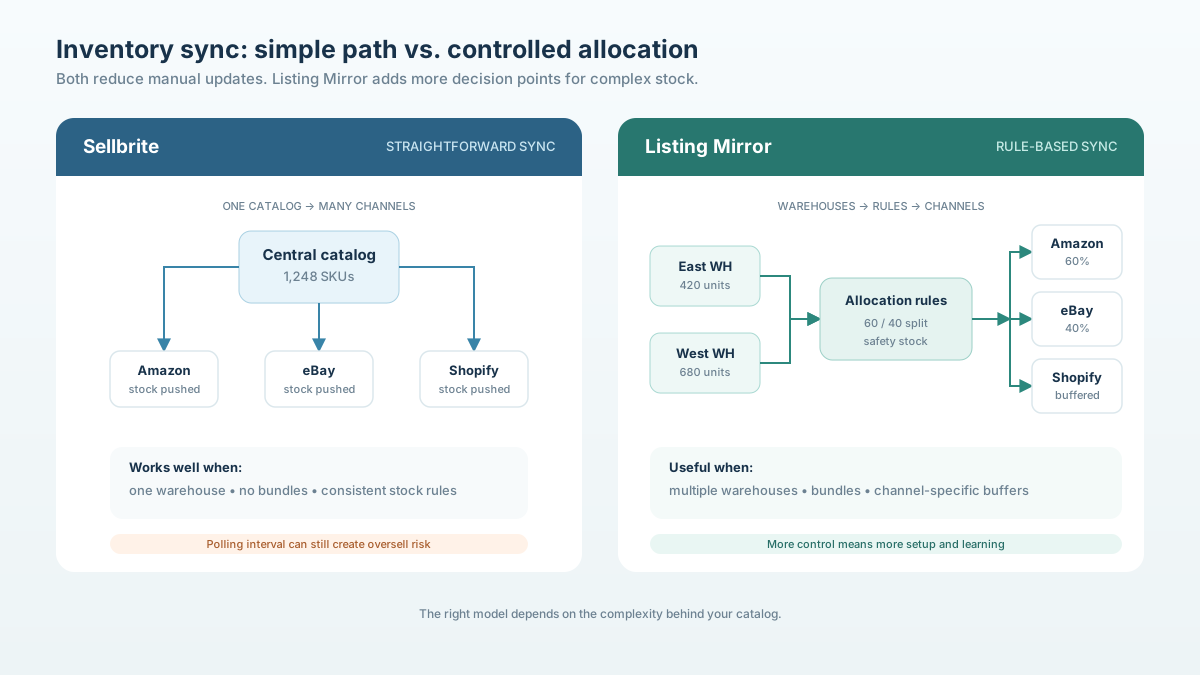
Listing Mirror offers more granular inventory control with multi-warehouse support and formula-based allocation, while Sellbrite provides simpler but less flexible sync.
Inventory sync is the most operationally critical feature of any multi-channel tool. When it works, you avoid overselling. When it fails, you cancel orders, eat penalties, and damage your marketplace health scores.
| Inventory Feature | Sellbrite | Listing Mirror |
|---|---|---|
| Real-time sync | Near real-time | Near real-time |
| Multi-warehouse support | Basic | Advanced (per-warehouse allocation) |
| Safety stock buffers | Global only | Per-channel, per-warehouse |
| Bundle/kit inventory | No | Yes |
| Formula-based allocation | No | Yes (e.g., allocate 60% to Amazon, 40% to eBay) |
| Sync frequency | Every 15-30 minutes | Every 15 minutes |
| FBA inventory integration | Yes | Yes |
| Oversell protection | Basic | Advanced with buffer rules |
Sellbrite's sync works well for straightforward scenarios: one warehouse, consistent inventory across channels, no bundling. It syncs reliably for most sellers under 1,000 SKUs.
Listing Mirror's sync handles complexity: multiple warehouses with different stock levels feeding different channels, kitted products where selling one bundle reduces component inventory, and formula-based allocation that distributes stock proportionally across channels based on sales velocity.
Where both fall short: Neither tool provides real-time sync in the truest sense. Both operate on polling intervals (15-30 minutes), which means fast-selling products can still oversell during flash sales or viral moments. For campaign readiness, you may need to manually reduce available stock before high-traffic events.
How Does Listing Creation and Management Compare?
Sellbrite prioritizes speed and simplicity in listing creation, while Listing Mirror offers more customization per channel at the cost of complexity.
| Listing Feature | Sellbrite | Listing Mirror |
|---|---|---|
| Bulk listing creation | Yes | Yes |
| CSV import/export | Yes | Yes |
| Template-based listings | Basic | Advanced |
| Channel-specific title customization | Limited | Yes |
| Channel-specific description | Limited | Yes |
| Image management | Basic (shared across channels) | Per-channel image sets |
| Variation/option support | Yes | Yes |
| Category mapping | Semi-automatic | Semi-automatic |
| Product linking across channels | Manual | Manual + auto-matching |
Sellbrite's approach: Create a product once, push it to multiple channels. The tool handles basic field mapping, but channel-specific customization is limited. If you need a different title on Amazon versus eBay, you can do it, but the workflow is not optimized for it.
Listing Mirror's approach: Create a master product, then customize per channel. You can set different titles, descriptions, images, and pricing for each marketplace. The tradeoff is more setup time per product — but the output is better optimized per channel.
For sellers following multi-channel product listing best practices, the ability to customize per channel is important. What works on Amazon's A10 algorithm differs from eBay's Cassini search. A tool that forces identical listings across channels leaves performance on the table.
How strong are your ecommerce operations? Score your ops in 2 minutes — Take the free scorecard. No signup required.
How Does Pricing Compare?
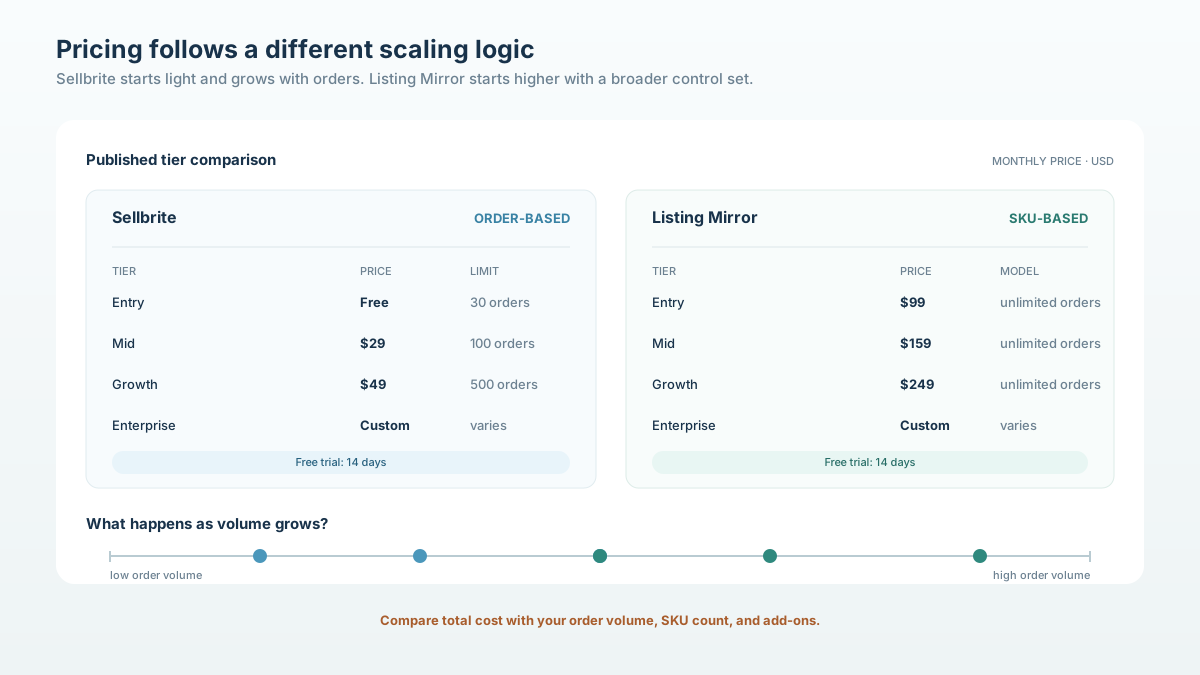
Sellbrite is cheaper for small sellers with simple needs. Listing Mirror costs more but includes features that larger sellers would otherwise pay extra for.
| Plan | Sellbrite | Listing Mirror |
|---|---|---|
| Entry level | Free (up to 30 orders/month) | $99/month |
| Mid tier | $29/month (up to 100 orders) | $159/month |
| Growth tier | $49/month (up to 500 orders) | $249/month |
| Enterprise | Custom | Custom |
| Free trial | Yes (14 days) | Yes (14 days) |
| Order-based pricing | Yes (limits per tier) | No (unlimited orders) |
| SKU limits | Varies by plan | Varies by plan |
Sellbrite's pricing model is order-based. You pay more as order volume increases. This works well for low-volume sellers but can become expensive as you scale. A seller processing 1,000 orders per month may find the per-order economics unfavorable.
Listing Mirror's pricing model is SKU-based with unlimited orders. You pay based on how many products you manage, not how many you sell. For high-volume sellers with a focused catalog, this model is more predictable and often cheaper at scale.
Hidden cost consideration: Sellbrite's free tier is attractive for testing, but the order caps mean you will outgrow it quickly. Listing Mirror's $99 entry point is a higher commitment upfront but includes features (multi-warehouse, bundling) that would require an upgrade or add-on with Sellbrite.
How Does Order Management Compare?
Both tools provide basic order management, but neither replaces a dedicated OMS for high-volume sellers.
| Order Feature | Sellbrite | Listing Mirror |
|---|---|---|
| Order import | Yes (all channels) | Yes (all channels) |
| Shipping label printing | Yes (via ShipStation integration) | Yes (via integrations) |
| Order routing by warehouse | No | Yes |
| Automated fulfillment rules | Basic | Moderate |
| Return processing | No | No |
| Order analytics | Basic | Moderate |
Neither Sellbrite nor Listing Mirror is designed as a primary order management system. Both pull orders from connected channels and provide basic visibility, but for order routing, shipping optimization, and return processing, you will likely need a dedicated solution.
How Does Reporting and Analytics Compare?
Listing Mirror provides more detailed reporting on inventory and sales performance, while Sellbrite's analytics are basic but functional.
| Reporting Feature | Sellbrite | Listing Mirror |
|---|---|---|
| Sales by channel | Yes | Yes |
| Inventory reports | Basic | Detailed (per-warehouse) |
| Listing performance | No | Basic |
| Profit margin tracking | No | No |
| Custom reports | No | Limited |
| Export to CSV | Yes | Yes |
Neither tool provides the depth of analytics that a serious multi-channel seller needs. For comprehensive operations metrics — health scores, compliance rates, audit results — you need a dedicated operations platform or ecommerce analytics dashboard.
What Do Users Say?
Sellbrite users praise ease of setup and clean interface but cite inventory sync delays and limited support. Listing Mirror users value depth but report a steeper learning curve.
Based on reviews from G2, Capterra, and marketplace seller forums:
Sellbrite — common praise:
- Quick setup (under 1 hour)
- Clean, intuitive interface
- Good Amazon integration
- Responsive customer support (when available)
Sellbrite — common complaints:
- Inventory sync delays during high-volume periods
- Limited customization per channel
- Order management is bare-bones
- Feature development has slowed since GoDaddy acquisition
Listing Mirror — common praise:
- Multi-warehouse inventory management
- Formula-based stock allocation
- More marketplace connections
- Detailed inventory reporting
Listing Mirror — common complaints:
- Steeper learning curve
- Interface feels dated compared to newer tools
- Setup takes longer
- Higher starting price
Which Tool Is Better for Different Seller Types?
Sellbrite fits small sellers with simple operations on US marketplaces. Listing Mirror fits mid-size sellers with complex inventory needs. Neither fits sellers who need Southeast Asian marketplace support.
| Seller Profile | Better Choice | Why |
|---|---|---|
| Under 100 SKUs, 1-2 US channels | Sellbrite | Simpler, cheaper, faster setup |
| 100-500 SKUs, multiple US channels | Listing Mirror | Multi-warehouse, better inventory |
| 500+ SKUs, US + SEA channels | Neither | No Shopee/Lazada/TikTok Shop support |
| High-volume, simple catalog | Listing Mirror | Unlimited orders model saves money |
| New seller testing multi-channel | Sellbrite | Free tier for testing |
| Bundling/kitting requirements | Listing Mirror | Native bundle inventory support |
| Operations-focused team | Neither | Neither provides SOPs, checklists, or audits |
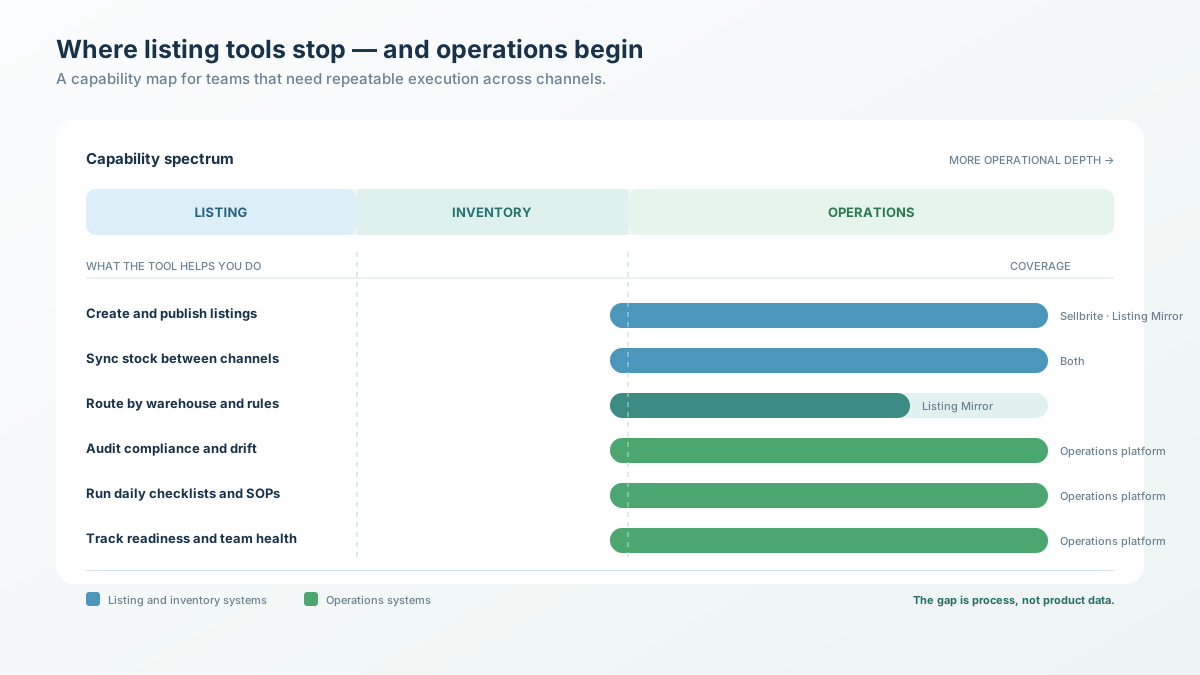
The operational gap both tools share: Neither Sellbrite nor Listing Mirror addresses the operational side of multi-channel selling. They handle listing and inventory — but not compliance audits, daily checklists, SOP management, health score tracking, or campaign readiness. If your challenge is not just "how do I list products" but "how do I run operations consistently across channels," you need a different category of tool.
What Are the Alternatives to Both?
If neither Sellbrite nor Listing Mirror fits, consider Linnworks for enterprise-level needs, ChannelAdvisor for large catalogs, or TaskForce for operations-first multi-channel management.
The multi-channel tool landscape extends beyond these two options:
- Linnworks — Enterprise-grade with deep ERP integration. Expensive but comprehensive for high-volume sellers. See our Linnworks alternative analysis.
- ChannelAdvisor — Built for large brands and retailers managing thousands of SKUs across dozens of channels. See our ChannelAdvisor alternative review.
- Sellercloud — Mid-market option with warehouse management and multi-channel support. See our Sellercloud alternative comparison.
- TaskForce — Operations platform that pairs multi-channel listing management with daily checklists, automated audits, SOPs, and health scores. Built for teams selling on Shopify, Shopee, Lazada, and TikTok Shop.
The right tool depends on your primary pain. If it is listing speed, Sellbrite works. If it is inventory complexity, Listing Mirror works. If it is operational consistency across channels — including SEA marketplaces — you need something purpose-built for operations.
How Should You Evaluate Multi-Channel Listing Tools?
Test with your actual catalog, your actual channels, and your actual team during a trial period — not with demo data in a sandbox.
Here is a practical evaluation framework:
Step 1: Define your must-haves. List the channels you sell on today and plan to sell on in 12 months. Any tool that does not support your channel mix is out.
Step 2: Test inventory sync under load. During your trial, run the tool alongside your existing system. Compare inventory counts after 48 hours. If they diverge, the tool's sync is not reliable enough.
Step 3: Test listing creation for your product types. Create 10 real products in the tool. Push them to all your channels. Check: Are titles correct? Images rendering? Categories mapped properly? This test reveals UX friction that demos hide.
Step 4: Evaluate the operational gap. Listing and inventory sync are table stakes. Ask: Does this tool help me run daily operations? Does it audit listing compliance? Does it track team task completion? If not, factor in the cost of a separate operations tool.
Step 5: Calculate total cost at your scale. Project your order volume and SKU count for the next 12 months. Calculate the cost on each tool's pricing model. Include the cost of add-ons and integrations you will need.
Frequently Asked Questions
Can I use Sellbrite and Listing Mirror together?
Technically yes, but it creates more problems than it solves. Running two inventory sync systems simultaneously causes sync conflicts. Pick one tool for listing and inventory, and supplement with specialized tools for gaps (operations platform for audits and checklists, shipping tool for fulfillment).
Does Sellbrite work for Shopee or Lazada?
No. Sellbrite does not support any Southeast Asian marketplaces. If you sell on Shopee, Lazada, or TikTok Shop, you will need a separate tool or platform for those channels.
Is Listing Mirror worth the higher price?
For sellers with multi-warehouse inventory, bundling/kitting needs, or more than 500 SKUs, the additional cost is usually justified by the inventory features alone. For simpler operations, Sellbrite or even a free tier tool may be sufficient.
How long does migration take?
Sellbrite: 1-3 hours for most catalogs. Listing Mirror: 3-8 hours depending on complexity and warehouse setup. Budget an additional week for verifying inventory sync accuracy before going live.
Which tool has better customer support?
Both offer email and chat support. Listing Mirror users generally report more responsive support for complex technical issues. Sellbrite users report faster response for basic questions but frustration with more complex scenarios post-GoDaddy acquisition.
Keep Reading
- Best Multi-Channel Listing Software — Comprehensive comparison of all major listing tools
- Multi-Channel Product Listing Best Practices — Platform-specific listing optimization
- Sellbrite Alternative — More options if Sellbrite does not fit
- Multi-Channel Inventory Management Guide — Deep dive on inventory sync strategies
Take the Next Step
Listing tools solve the "where do I publish" problem. They do not solve the "how do I run operations" problem. If you want to see where your multi-channel operations stand — beyond listing and inventory — take the Ecommerce Operations Scorecard. It takes 2 minutes and shows you exactly what to fix first.
Find out what your operation is missing
Answer 10 questions. Get your ops score. Takes 2 minutes.
Take the Scorecard