

How strong are your e-commerce ops? Take the 2-min scorecard.
Score Your OpsMulti-channel listing is deceptively simple. You have a product. You want it on Shopify, Shopee, Lazada, and TikTok Shop. Copy the title, upload the images, set the price, publish. Done — except nothing actually matches, half your listings get suppressed, and your inventory counts diverge within 48 hours.
The gap between "listed" and "listed correctly" is where most multi-channel sellers bleed money. Different platforms enforce different rules for titles, images, categories, and attributes. What earns you a top-of-search placement on Shopee gets your listing rejected on Lazada. The image that converts on Shopify violates TikTok Shop's content policy.
This guide covers the platform-specific requirements, the operational workflows that keep listings consistent, and the systems that let you scale past a few hundred SKUs without hiring a dedicated listing team.
What Is Multi-Channel Product Listing?
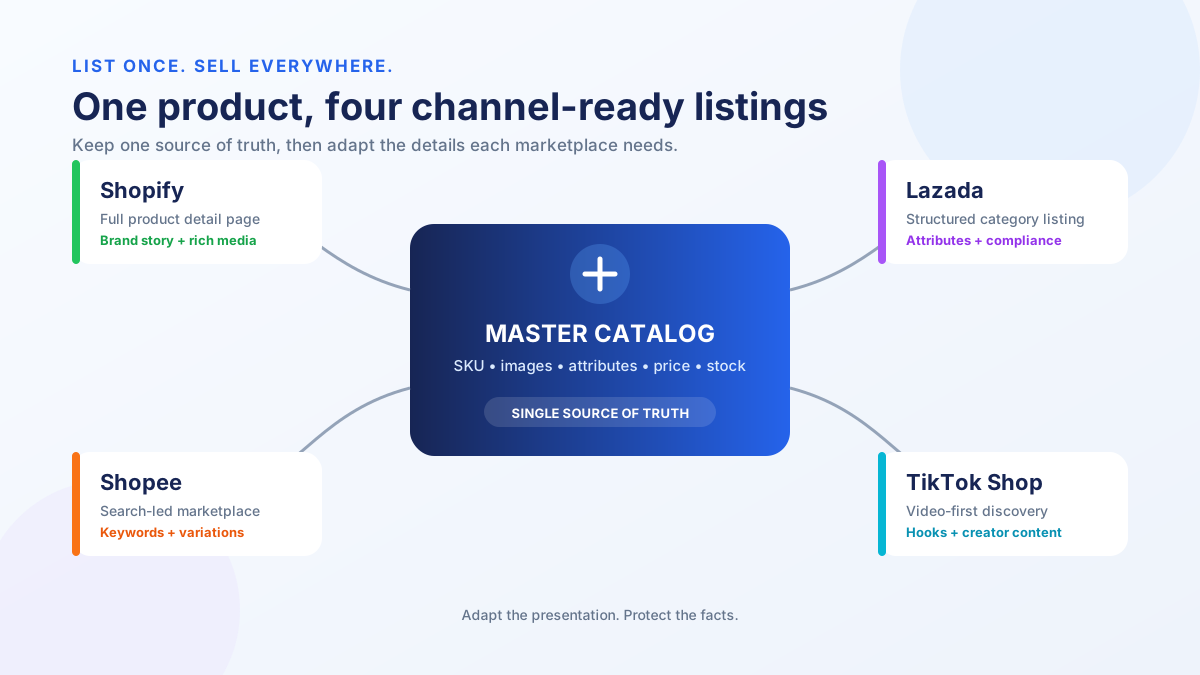
Multi-channel product listing is the process of publishing and maintaining product data — titles, images, descriptions, pricing, and inventory — across multiple sales channels from a single source of truth.
A multi-channel product listing strategy means your product information lives in one canonical location and gets adapted for each platform's specific requirements. The opposite — manually creating separate listings on each channel — works until you hit about 50 SKUs. After that, inconsistencies multiply faster than you can catch them.
The goal is not identical listings everywhere. Each platform has different buyer behaviors, search algorithms, and content rules. The goal is controlled variation: one source of truth with platform-specific adaptations applied systematically.
Why Do Listing Requirements Differ Across Platforms?
Each marketplace optimizes its listing format for its own search algorithm, buyer experience, and content moderation policies — which means the same product needs different titles, images, and attributes on every channel.
Shopee's search algorithm weights keyword density in titles heavily. Lazada enforces strict image backgrounds. Shopify gives you full control but no built-in traffic. TikTok Shop prioritizes video content and restricts certain image types.
These differences exist because each platform serves a different buying behavior:
- Shopee — Search-driven discovery. Buyers type keywords and browse results. Title optimization is critical.
- Lazada — Category-driven browsing with stricter content moderation. Professional images and complete attributes matter more.
- Shopify — Your own storefront. SEO and brand storytelling drive traffic. You control everything.
- TikTok Shop — Content-driven discovery. Buyers find products through videos and live streams. Visual content rules.
Understanding these differences is the first step. Systematizing your response to them is what makes multi-channel listing sustainable.
What Are the Title Limits and Formulas Per Platform?
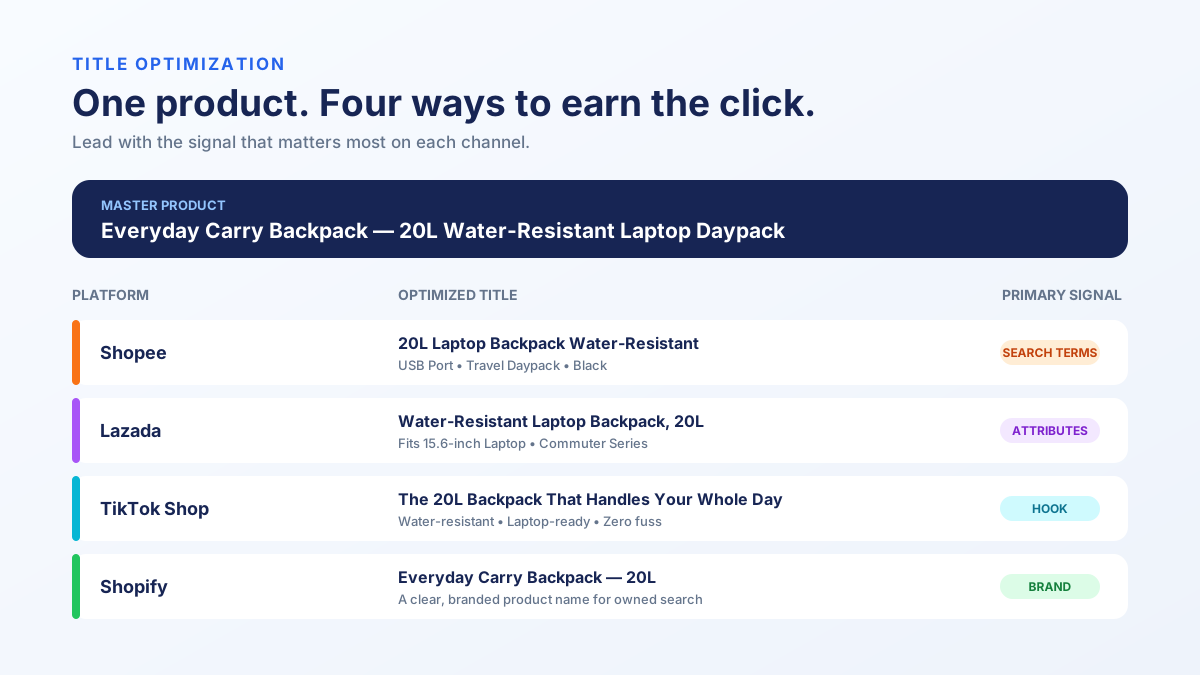
Title character limits range from 70 characters on TikTok Shop to 255 on Lazada, and each platform rewards a different title structure.
Getting your title right is the single highest-leverage listing optimization. It affects search ranking, click-through rate, and buyer trust. Here are the platform-specific rules:
| Platform | Character Limit | Recommended Formula | Example |
|---|---|---|---|
| Shopify | No hard limit (60 for SEO) | Brand + Product + Key Benefit | "Hydra Bottle - 750ml Insulated Water Bottle" |
| Shopee | 120 characters | Brand + Product + Feature + Spec + Keyword | "Hydra Bottle 750ml Insulated Water Bottle BPA Free Hot Cold 24hr" |
| Lazada | 255 characters | Brand + Product Name + Model + Specification | "Hydra Bottle 750ml Vacuum Insulated Stainless Steel Water Bottle BPA Free - Keeps Hot 12hr Cold 24hr" |
| TikTok Shop | 70 characters | Product + Key Feature + Spec | "750ml Insulated Water Bottle BPA Free Hot Cold" |
Shopee title tips: Front-load the most searched keywords. Use Shopee's search bar autocomplete to find real buyer queries. Avoid symbols and excessive capitalization — Shopee may suppress listings that look spammy.
Lazada title tips: You have 255 characters, but that does not mean you should use all of them. Lazada's algorithm considers relevance, not just keyword density. Include model numbers and specifications that buyers filter by.
TikTok Shop title tips: Per TikTok Shop's seller documentation, with only 70 characters, every word must earn its place. Lead with the product category term. Skip the brand name if it is not well-known — buyers on TikTok discover products, they do not search for brands.
Shopify title tips: Your title doubles as your SEO title tag. Keep it under 60 characters for full display in Google search results. Focus on the primary search term your buyers use.
What Image Specs Does Each Platform Require?
Image requirements vary from 500x500 minimum on Shopee to 2000x2000 recommended on Lazada, with different rules for backgrounds, watermarks, and image count.
Images sell products. But the image that performs well on your Shopify store may get rejected on Lazada or suppressed on TikTok Shop. Here is what each platform requires:
| Requirement | Shopify | Shopee | Lazada | TikTok Shop |
|---|---|---|---|---|
| Minimum resolution | No minimum | 500x500 px | 330x330 px | 600x600 px |
| Recommended resolution | 2048x2048 px | 1024x1024 px | 2000x2000 px | 1200x1200 px |
| Aspect ratio | Flexible | 1:1 | 1:1 | 1:1 |
| Max file size | 20 MB | 2 MB | 3 MB | 5 MB |
| Image slots | Unlimited | 9 | 8 | 9 |
| White background required | No | No (recommended) | Yes (main image) | No |
| Watermarks allowed | Yes | Limited | No | No |
| Text on image | Yes | Limited | Restricted | Restricted |
| Video support | Yes | Yes | Yes | Required for some categories |
The practical workflow: Create your master images at 2048x2048 on a white background with no text overlays. This master set works on Lazada without modification. For Shopee, add lifestyle images and keyword-rich infographics in slots 2-9. For TikTok Shop, add short video clips. For Shopify, add brand-styled images that match your store aesthetic.
Store master images in a central asset library. When a product image changes, update the master and re-export to each channel. If you are managing more than 100 SKUs, this process needs to be automated or you will fall behind.
How Should You Map Categories Across Platforms?
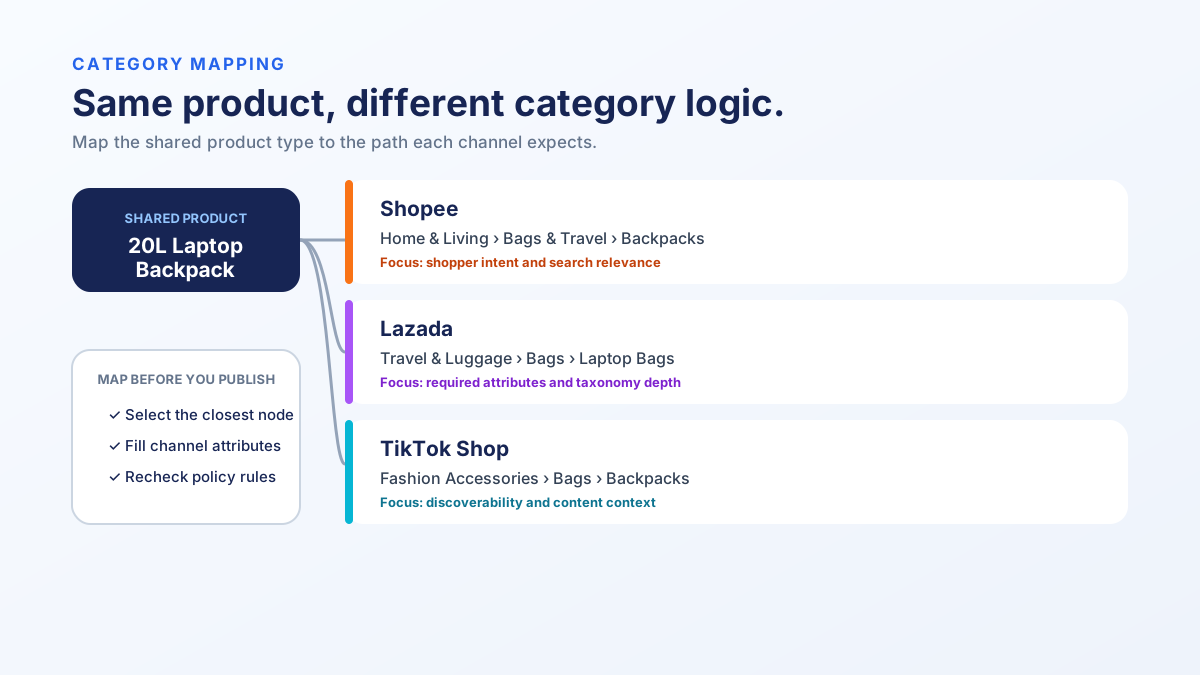
Category trees differ on every marketplace, and selecting the wrong category buries your product in search results — or triggers listing rejection.
Category mapping is the most underestimated part of multi-channel listing. Shopee has over 30,000 category nodes. Lazada has a different tree entirely. TikTok Shop uses its own classification. A product that belongs in "Home & Living > Kitchen > Water Bottles" on Shopee might map to "Sports & Outdoors > Drinkware" on Lazada.
Wrong category placement causes three problems:
- Search suppression — Buyers browsing the correct category never see your product
- Attribute mismatch — Each category has required attributes; wrong category means missing fields
- Commission differences — Some categories carry higher commission rates
Building a category map:
Start with your top 20 products by revenue. For each product, find the correct category on every platform manually. Document the mapping. Look for patterns — most of your catalog probably fits into 5-10 category groups.
| Your Category | Shopee Category | Lazada Category | TikTok Shop Category |
|---|---|---|---|
| Water Bottles | Home & Living > Kitchen & Dining > Drinkware | Sports & Outdoors > Sports Accessories > Water Bottles | Home Supplies > Kitchenware > Cups & Bottles |
| Phone Cases | Mobile & Accessories > Cases & Covers | Mobiles & Tablets > Mobile Accessories > Cases & Covers | Phones & Electronics > Phone Accessories > Phone Cases |
| Face Serum | Beauty > Skincare > Serum & Essence | Health & Beauty > Skin Care > Face > Serum | Beauty & Personal Care > Skincare > Face Serums |
Once you have the mapping, apply it to your entire catalog. New products get categorized in your master catalog and the mapping translates automatically to each platform.
For teams managing SKU mappings across channels, a multi-channel inventory management system that supports category mapping saves hours of manual work per week.
What Attributes and Specifications Are Required Per Platform?
Each marketplace requires different product attributes — and leaving them blank tanks your search visibility and category eligibility.
Beyond title, images, and category, each platform requires a set of attributes (sometimes called specifications or product details). These are structured data fields like brand, material, color, size, and weight.
Shopee uses these attributes for filtered search. A buyer filtering for "stainless steel" water bottles will not see your listing if you left the material field blank — even if "stainless steel" appears in your title.
Lazada requires more attributes than any other SEA marketplace. Missing required attributes can prevent listing publication entirely. Optional attributes affect your Listing Quality Score, which influences search ranking.
TikTok Shop has fewer required attributes but uses them for product recommendations. Complete attributes improve your placement in "related products" and "you may also like" sections.
The system: Maintain a master attribute sheet for your catalog. Map each platform's required and optional attributes. When creating new products, fill in all attributes at the master level and let your listing tool or export process populate each platform.
How Do You Keep Pricing Consistent Across Channels?
Price consistency does not mean identical prices — it means intentional pricing with documented rules for each channel's fee structure and competitive dynamics.
Each marketplace takes a different cut. If you set the same retail price on every channel, your margin varies by platform. If you adjust prices to maintain consistent margins, buyers who cross-shop may notice the difference.
Here is a typical fee breakdown:
| Fee Component | Shopify | Shopee | Lazada | TikTok Shop |
|---|---|---|---|---|
| Commission | 0% (2% for Shopify Payments) | 2-6% | 2-5% | 2-8% |
| Transaction fee | 2.9% + $0.30 | 2-3% | 1-2% | 1% |
| Shipping subsidy | You pay all | Partial (Free Shipping Program) | Partial | Partial |
| Advertising cost (typical) | 10-20% of revenue | 5-15% of revenue | 5-15% of revenue | 3-10% of revenue |
Pricing strategy options:
- Uniform pricing — Same price everywhere. Simplest to manage. Margins vary by channel.
- Margin-normalized pricing — Adjust price per channel to hit the same margin target. Requires a pricing model.
- Channel-specific pricing — Different prices based on channel competition and buyer price sensitivity.
Most experienced multi-channel sellers use margin-normalized pricing with guardrails: prices can vary up to 5-10% across channels, but not more. Larger discrepancies trigger a pricing audit to investigate.
How strong are your ecommerce operations? Score your ops in 2 minutes — Take the free scorecard. No signup required.
How Do You Manage Inventory Across Channels?
Inventory sync is the most operationally dangerous part of multi-channel selling — overselling creates cancelled orders, penalties, and angry customers.
When a product sells on Shopee, the inventory must decrease on Lazada, TikTok Shop, and Shopify within minutes. Delayed sync causes overselling. Overselling causes order cancellations. Cancellations trigger marketplace penalties that can suspend your shop.
Sync approaches:
- Real-time API sync — Inventory updates push to all channels within seconds of a sale. Requires a tool with marketplace API integrations.
- Scheduled batch sync — Inventory updates every 15-60 minutes. Acceptable for slow-moving products, dangerous for fast sellers.
- Safety stock buffers — Reserve a percentage of inventory per channel (e.g., only make 80% of stock available on each channel). Prevents overselling but reduces total sell-through.
The recommended approach: Real-time sync with safety stock buffers for your top 20% of SKUs by velocity. Batch sync is acceptable for the long tail. Monitor sync lag daily — if any channel's inventory is more than 15 minutes stale, investigate immediately.
For a detailed breakdown of inventory management workflows, see the multi-channel inventory management guide.
What Does a Multi-Channel Listing Workflow Look Like?
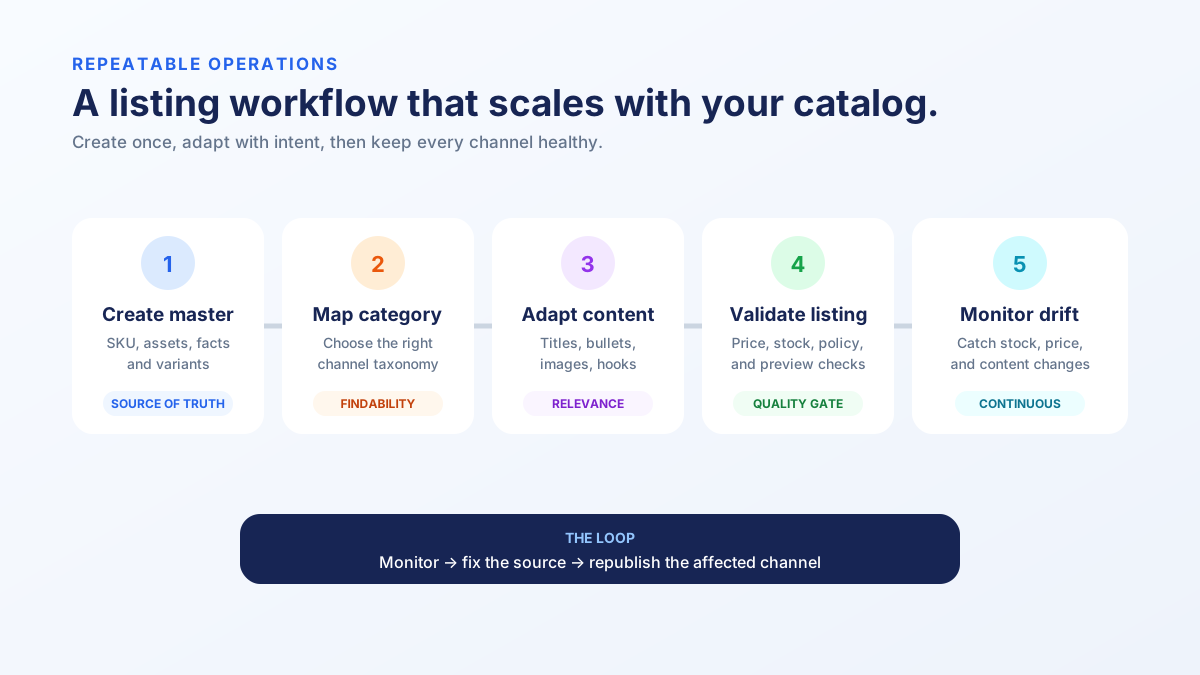
A repeatable listing workflow has five stages: create master data, adapt per channel, publish, verify, and monitor.
Here is the workflow used by operations teams managing 500+ SKUs across four channels:
Stage 1 — Master product creation. Create the product in your central catalog with all data: title base, full description, all images at max resolution, complete attributes, pricing model, and category mapping.
Stage 2 — Channel adaptation. Apply platform-specific rules: truncate titles to character limits, export images at correct resolution, map to platform categories, set channel-specific pricing.
Stage 3 — Publish. Push listings to each channel via API or bulk upload. Use draft mode where available to review before going live.
Stage 4 — Verify. Check that listings are live, correctly categorized, showing the right images, and priced correctly. This is where most teams skip a step and end up with ghost listings or wrong prices.
Stage 5 — Monitor. Track listing health ongoing: are images still rendering? Has the category tree changed? Did a price rule override your intended price? Automated listing compliance audits catch drift before it costs you sales.
What Are the Most Common Multi-Channel Listing Mistakes?
The top mistakes are copy-pasting titles without adaptation, ignoring required attributes, and treating listing as a one-time event instead of an ongoing process.
After auditing thousands of multi-channel listings, these are the errors that appear most frequently:
1. Copy-paste titles across platforms. A 120-character Shopee-optimized title gets truncated on TikTok Shop. A short Shopify title wastes Lazada's 255-character allowance. Each platform needs its own title variant.
2. Missing or wrong category. Products listed in "Other" or a vaguely related category lose 30-60% of their potential search visibility. Take the time to find the right leaf category.
3. Incomplete attributes. Every blank attribute field is a missed filter opportunity. Buyers who filter by brand, size, or material will never find your product if those fields are empty.
4. Outdated inventory. A product that sold out on one channel but still shows available on another results in a cancelled order and a penalty point. Real-time inventory sync is not optional at scale.
5. No listing verification after publishing. Just because you clicked "publish" does not mean the listing went live correctly. Image upload failures, category rejections, and attribute validation errors happen silently.
6. One-and-done mindset. Marketplaces update their category trees, attribute requirements, and content policies regularly. A listing that was compliant six months ago may be suppressed today.
What Tools Help With Multi-Channel Listing?
The right tool depends on your SKU count and channel mix — basic listing tools work under 200 SKUs, but operations platforms are necessary beyond that.
| Tool Type | Best For | Examples | Limitation |
|---|---|---|---|
| Manual spreadsheets | Under 50 SKUs, 1-2 channels | Google Sheets, Excel | No automation, error-prone |
| Listing tools | 50-500 SKUs, inventory sync focus | Sellbrite, Listing Mirror, Linnworks | Limited operations features |
| Operations platforms | 200+ SKUs, team workflows | TaskForce | Requires setup investment |
| Enterprise middleware | 5,000+ SKUs, ERP integration | ChannelAdvisor, Pipe17 | High cost, complex implementation |
For a detailed comparison of listing tools, see our Sellbrite vs Listing Mirror breakdown or the best multi-channel listing software guide.
How Do You Scale From 100 to 1,000+ SKUs?
Scaling requires shifting from per-product workflows to template-driven, rule-based listing systems where exceptions are managed, not the norm.
At 100 SKUs, you can review every listing manually. At 1,000 SKUs across four channels, you are managing 4,000 individual listings. Manual review becomes impossible.
What changes at scale:
- Templates replace manual entry. Define listing templates per product category with pre-filled attributes, title formulas, and image requirements.
- Rules replace decisions. Pricing rules, inventory allocation rules, and category mapping rules apply automatically. Humans handle exceptions only.
- Audits replace spot checks. Automated compliance audits scan all listings on a schedule and flag violations. You fix what the audit finds instead of manually reviewing everything.
- SOPs replace tribal knowledge. When a new team member joins, they follow the documented SOP instead of asking the person who "knows how it works."
The shift from manual to systematic listing management is the difference between a business that plateaus at a few hundred SKUs and one that scales to thousands.
Frequently Asked Questions
How often should I audit my multi-channel listings?
Run automated compliance audits weekly at minimum. Manual spot-checks of your top 20 products should happen monthly. After any platform policy update, run a full audit within 48 hours. Platform category tree changes happen quarterly — check your category mappings after each update.
Can I use the same product images on every platform?
You can use the same base images, but you should adapt them per platform. Lazada requires white backgrounds for main images. Shopee performs better with lifestyle images in secondary slots. TikTok Shop increasingly favors video over static images. Create a master image set and adapt for each channel.
What is the biggest risk of multi-channel listing?
Inventory overselling. When stock counts diverge across channels, you sell products you do not have. This triggers order cancellations, which carry penalty points on Shopee and Lazada. Enough penalty points can suspend your shop. Real-time inventory sync is the most critical operational requirement.
How do I handle products that are only available on some channels?
Use channel-specific availability flags in your master catalog. Some products may not fit certain platforms — a heavy industrial product has no place on TikTok Shop. Manage availability at the catalog level, not by manually skipping channels during listing creation.
Should I use different product descriptions per platform?
Yes. Shopee rewards keyword-rich descriptions. Lazada favors structured, specification-heavy content. Shopify gives you space for brand storytelling. TikTok Shop descriptions are secondary to video content. Write a master description, then create platform-specific variants.
Keep Reading
- Best Multi-Channel Listing Software — Side-by-side comparison of the top listing tools
- Multi-Channel Inventory Management Guide — How to keep stock accurate everywhere
- Ecommerce Compliance Guide — Marketplace rules you need to follow
- How to Sell on Shopee — The complete Shopee seller guide
Take the Next Step
Your listings are only as strong as the operations behind them. If you are managing products across multiple channels and want to know where the gaps are, take the Ecommerce Operations Scorecard — it takes 2 minutes and shows you exactly what to fix first.
Find out what your operation is missing
Answer 10 questions. Get your ops score. Takes 2 minutes.
Take the Scorecard