

How strong are your e-commerce ops? Take the 2-min scorecard.
Score Your OpsMost ecommerce SOPs collect dust. You spend hours documenting a process. You share it with the team. Two weeks later, nobody remembers it exists. The same mistakes keep happening. The same questions get asked in the group chat. The SOP sits in a Google Drive folder with 47 other documents nobody has opened since onboarding.
The problem is not that your team is lazy. The problem is that most SOPs are written wrong, stored wrong, and enforced wrong. They read like legal contracts instead of job aids. They live in folders instead of workflows. They have no accountability mechanism — nobody checks whether the SOP was followed.
This guide covers how to write ecommerce SOPs that people actually use, how to format them for quick reference during real work, and how to build enforcement into your daily operations so following the SOP becomes the default, not the exception.
What Is an Ecommerce SOP?
An ecommerce SOP (Standard Operating Procedure) is a step-by-step document that defines exactly how a recurring operational task should be performed, by whom, and how to verify it was done correctly.
An SOP is not a training manual. It is not a strategy document. It is a job-level instruction set that a team member opens when performing a specific task. Think recipe, not cookbook.
In ecommerce operations, SOPs cover tasks like processing returns, updating product listings, running inventory counts, preparing for a campaign, responding to marketplace penalties, and dozens of other recurring activities that happen across Shopify, Shopee, Lazada, and TikTok Shop.
The difference between a team that runs smoothly and one that constantly firefights usually comes down to whether these tasks are documented and enforced — or left to individual memory and interpretation.
Why Do Most Ecommerce SOPs Fail?
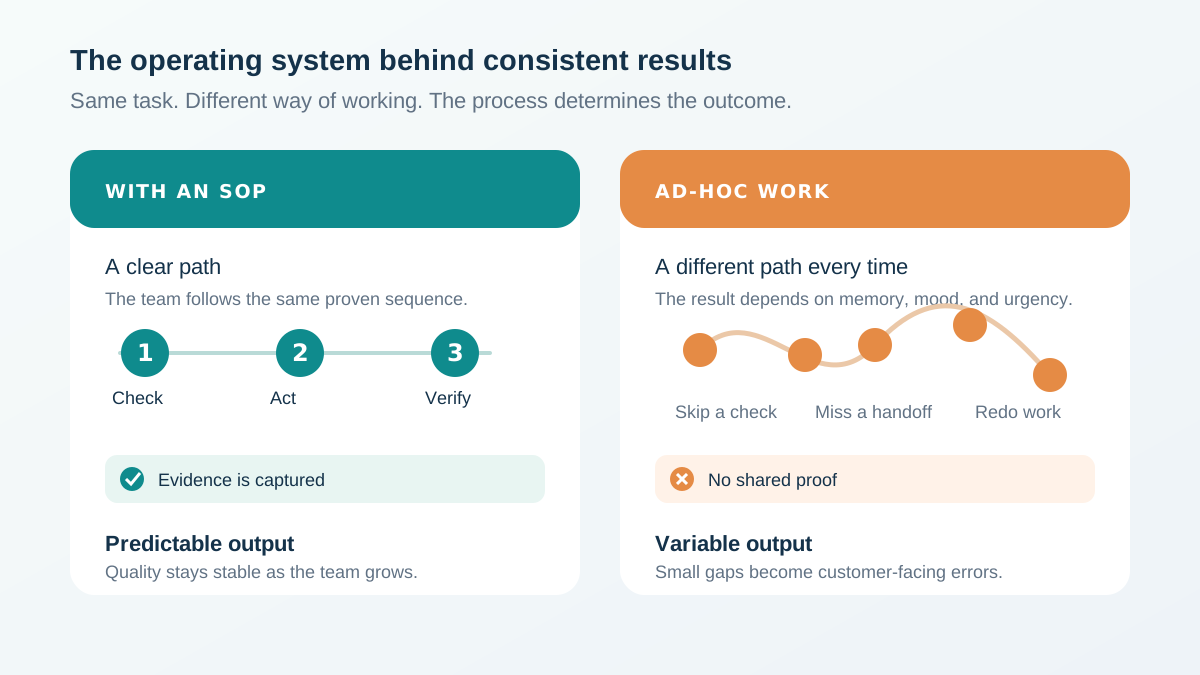
SOPs fail because they are written for documentation purposes, not for real-time use during task execution.
The root causes are predictable:
Written too long. A 15-page SOP for processing returns guarantees nobody will read it mid-task. SOPs compete with time pressure. If the document takes longer to read than to do the task from memory, the team skips it.
No visual structure. Walls of text without headers, numbered steps, screenshots, or decision trees force the reader to parse the entire document to find the one step they need. SOPs need to be scannable.
Stored in the wrong place. An SOP buried three folders deep in Google Drive is invisible during daily work. SOPs need to appear inside the workflow — attached to the checklist task, embedded in the tool, or one click away from where the work happens.
No versioning. Processes change. If the SOP does not update when the process does, the team learns to distrust it. One outdated step erodes confidence in the entire document.
No enforcement. The biggest failure. If nobody checks whether the SOP was followed, following it becomes optional. Optional processes get skipped under time pressure — every single time.
How Should You Structure an Ecommerce SOP?
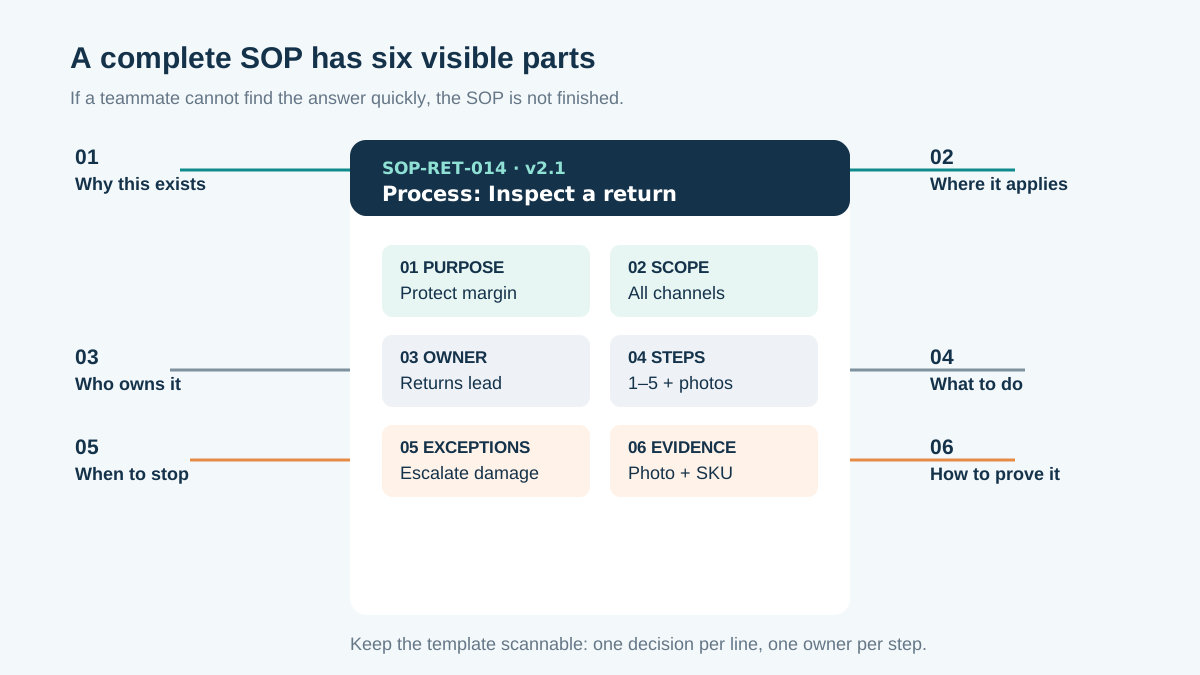
Every SOP needs six sections: purpose, scope, prerequisites, step-by-step procedure, verification criteria, and revision history.
Here is the template that works for ecommerce operations teams:
| Section | What It Contains | Length Target |
|---|---|---|
| Purpose | Why this SOP exists — what problem it prevents | 1-2 sentences |
| Scope | Which channels, products, or situations it applies to | 1-3 bullets |
| Prerequisites | What the person needs before starting (access, tools, data) | Bullet list |
| Procedure | Numbered step-by-step instructions with screenshots | 5-15 steps |
| Verification | How to confirm the task was done correctly | 2-5 checkpoints |
| Revision History | Date, author, what changed | Table |
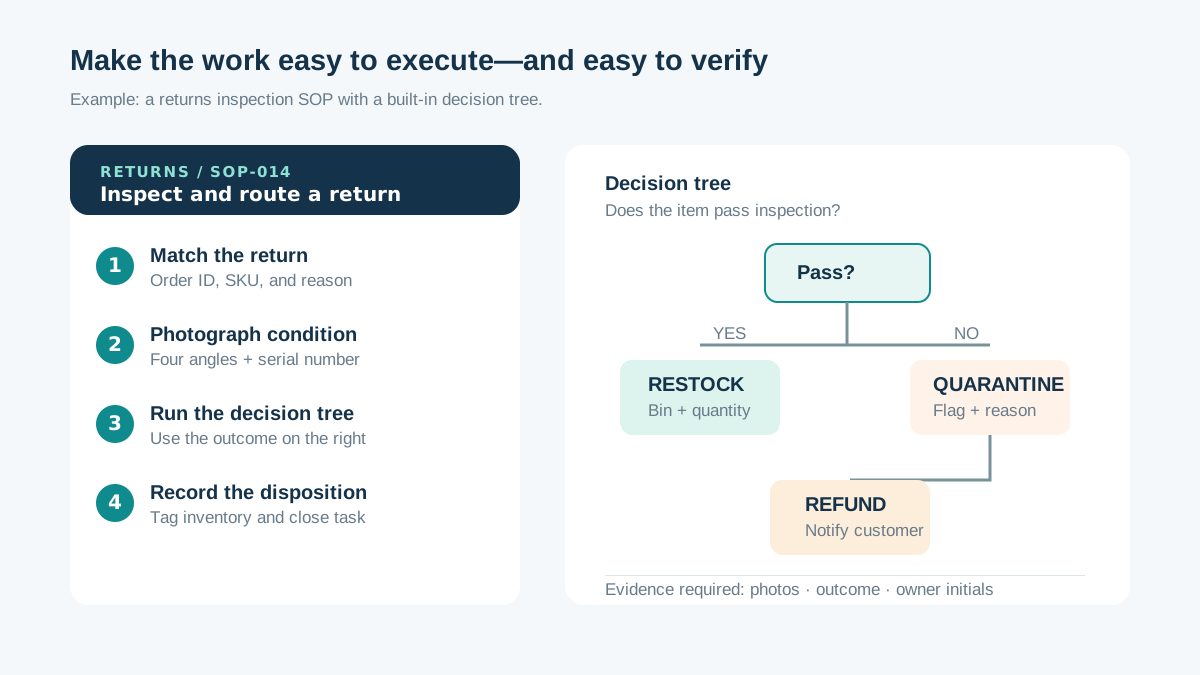
Example — Return Processing SOP:
Purpose: Ensure all marketplace returns are processed within 24 hours with correct refund amounts and inventory adjustments.
Scope: Applies to returns on Shopee, Lazada, and TikTok Shop. Shopify returns follow a separate process.
Prerequisites: Access to Seller Centre for each marketplace. Access to inventory management system. Return authorization workflow permissions.
Procedure:
- Open the marketplace Seller Centre
- Navigate to Returns/Refunds section
- Review the return request: check reason, photos, timeline
- If approved: confirm return, initiate refund, update inventory
- If rejected: document reason, respond to buyer within 12 hours
- Log the return in the tracking spreadsheet with order ID, reason, and resolution
Verification: Return processed within 24 hours. Refund amount matches original payment minus applicable deductions. Inventory count updated. Return logged in tracking system.
This structure keeps the SOP short enough to use during actual work while including enough context for someone doing the task for the first time.
How Do You Write SOPs That People Actually Read?
Write at a sixth-grade reading level, use numbered steps instead of paragraphs, include screenshots for every step that involves a screen, and keep the total under two pages.
Here are the writing rules that separate useful SOPs from shelf decorations:
Rule 1: One task per SOP. Do not combine "process returns" and "issue refunds" into one document. Each SOP should cover exactly one task that one person performs in one sitting.
Rule 2: Start every step with a verb. "Click the Returns tab." "Enter the refund amount." "Upload the proof photo." Action-first language eliminates ambiguity.
Rule 3: Include the exact click path. Not "go to returns." Instead: "Click Orders > Returns/Refunds > Pending." Specificity prevents wrong turns.
Rule 4: Add screenshots with annotations. Circle the button. Arrow the field. Highlight the section. Tools like Loom and Scribe can auto-generate annotated screenshots. A screenshot with a red circle saves five sentences of description.
Rule 5: Flag decision points. When a step has an if/then branch, make it visually obvious. Use bold text or a callout box: "If the return reason is 'defective,' proceed to Step 7. If 'change of mind,' proceed to Step 8."
Rule 6: State the expected result after each major step. "After clicking Submit, you should see a confirmation banner. If you see an error message instead, check that the refund amount does not exceed the original payment."
Rule 7: Keep it under two pages. If your SOP exceeds two pages, it covers too much. Split it into multiple SOPs or move background context into a separate training document.
What SOPs Does Every Ecommerce Team Need?
Start with the SOPs that cover your highest-frequency and highest-risk tasks — daily order processing, listing creation, inventory updates, and marketplace penalty response.
Here are the SOPs that every multi-channel ecommerce team should have documented:
| Priority | SOP | Frequency | Risk If Missing |
|---|---|---|---|
| Critical | Order processing and fulfillment | Daily | Late shipments, penalties |
| Critical | Return and refund processing | Daily | Customer complaints, rating drops |
| Critical | Inventory count and reconciliation | Weekly | Overselling, stockouts |
| Critical | Marketplace penalty response | As needed | Shop suspension |
| High | New product listing creation | Weekly | Inconsistent listings, suppression |
| High | Price update and promotion setup | Weekly | Margin loss, pricing errors |
| High | Campaign preparation checklist | Monthly | Missed campaigns, stockouts |
| High | Customer inquiry response | Daily | Low chat response rate, penalties |
| Medium | Seller health metric review | Weekly | Gradual performance decline |
| Medium | Listing compliance audit | Weekly | Suppressed listings |
| Medium | New team member onboarding | As needed | Slow ramp-up, repeated mistakes |
| Medium | Marketplace account setup | As needed | Configuration errors |
Start with the critical tier. Document those four SOPs first. Run them for two weeks. Fix what does not work. Then move to the high tier.
Do not try to document everything at once. The fastest way to kill an SOP initiative is to spend a month writing 30 documents that nobody uses. Four good SOPs beat thirty mediocre ones.
For a detailed breakdown of the daily tasks that need SOPs, see the ecommerce daily operations checklist.
How Do You Format SOPs for Quick Reference?
Use headers, numbered steps, bold keywords, screenshots, and decision tree diagrams — the goal is a team member finding the right step within 10 seconds.
Formatting is not cosmetic. It is functional. A well-formatted SOP gets used. A poorly formatted one gets ignored.
Headers as navigation. Every major phase of the task gets a header. A team member scanning for "how to reject a return" should be able to find it by scrolling through headers, not reading every line.
Numbered steps as the backbone. Sequential tasks must be numbered, not bulleted. Numbers create order. Bullets imply interchangeability.
Bold for critical information. Bold the consequence of skipping a step: "Skipping this step will result in duplicate refunds." Bold the fields that must be filled: "Enter the Order ID and Return Reason."
Screenshots inline, not in an appendix. The screenshot belongs immediately after the step it illustrates. Forcing users to flip to an appendix breaks their workflow.
Decision trees for branching logic. When a process has multiple paths based on conditions, a visual decision tree communicates the logic faster than nested if/then text.
Color coding for environment. If your SOP covers multiple platforms, use consistent color labels: blue for Shopee steps, orange for Lazada steps, green for Shopify steps. Readers immediately know which steps apply to their context.
How strong are your ecommerce operations? Score your ops in 2 minutes — Take the free scorecard. No signup required.
How Do You Enforce SOP Compliance?
Enforcement requires three things: embedding SOPs in daily checklists, requiring evidence of completion, and reviewing compliance metrics weekly.
Writing the SOP is 30% of the job. Enforcement is 70%. Here is how to make compliance the default:
Embed SOPs in checklists. Instead of expecting team members to find and open the SOP independently, link it directly to the checklist task. When the daily checklist says "Process pending returns," the SOP link is right there. One click, not a folder search.
Require evidence. The checklist task is not complete until the team member provides evidence — a screenshot of the processed return, a photo of the packed order, a link to the updated listing. Evidence turns "I did it" into "here's proof I did it correctly."
Track completion rates. If the returns SOP has a 60% completion rate, you have a process problem — not a people problem. Maybe the SOP is too long. Maybe the tool is cumbersome. Maybe the workload is unrealistic. The data tells you where to investigate.
Review weekly. Spend 15 minutes per week reviewing SOP compliance across the team. Which SOPs have low completion rates? Which tasks consistently skip the verification step? This review surfaces operational gaps before they become customer complaints.
Update when reality changes. When a marketplace updates its return policy, update the SOP within 24 hours. Nothing destroys SOP trust faster than a procedure that contradicts what the team sees on screen. Keep a versioning system so the team always accesses the latest version.
How Do You Roll Out SOPs Without Team Resistance?
Start with one painful process, co-create the SOP with the person who does the work, pilot for two weeks, then expand based on results — not management mandate.
SOP rollouts fail when they feel like top-down control. The team member who has been processing returns for six months does not want a document telling them how to do their job — unless that document actually makes their job easier.
Step 1: Pick the pain point. Ask the team: "What task causes the most confusion, errors, or rework?" Start there. When the first SOP solves a real problem, the team asks for more.
Step 2: Co-create with the doer. The person who performs the task writes the first draft. They know the actual steps — including the workarounds and edge cases that management does not see. Your job is to structure and format their knowledge, not to invent a process from a conference room.
Step 3: Pilot with a small group. Run the SOP for two weeks with 2-3 team members. Collect feedback: Which steps are unclear? What is missing? What takes too long? Revise before rolling out to the full team.
Step 4: Show the results. "Since we started using the returns SOP, our processing time dropped from 3 hours to 45 minutes and return-related complaints decreased by 40%." Results create buy-in faster than mandates.
Step 5: Expand gradually. Add one new SOP per week. Each one follows the same pattern: identify pain, co-create, pilot, revise, roll out. Within two months, you have a library of battle-tested SOPs built by the people who use them.
How Do You Keep SOPs Updated?
Assign an owner to every SOP, schedule quarterly reviews, trigger immediate updates when tools or marketplace policies change, and track version history.
SOPs rot. A six-month-old SOP in a fast-moving ecommerce environment is almost certainly outdated. Marketplace interfaces change. New tools get adopted. Policies update. Workarounds become unnecessary.
Assign ownership. Every SOP has one person responsible for keeping it current. Not a team. One person. Shared ownership means nobody owns it.
Quarterly review cycle. Every 90 days, the SOP owner walks through the procedure to verify accuracy. They check: Are the screenshots current? Do the click paths still work? Have any tools changed? Is the verification method still valid?
Trigger-based updates. Certain events demand immediate SOP revision: marketplace policy changes, new tool adoption, process redesign, team restructuring. Build these triggers into your operations rhythm.
Version control. Every SOP update creates a new version with a date, author, and summary of changes. Team members should always see the latest version. Stale versions should be archived, not deleted — you may need to reference them.
| Trigger | Action | Timeline |
|---|---|---|
| Marketplace policy change | Review and update affected SOPs | Within 24 hours |
| New tool or system adopted | Rewrite affected procedures | Before go-live |
| Team member reports error in SOP | Investigate and correct | Within 48 hours |
| Quarterly review cycle | Full SOP audit | Every 90 days |
| New team member onboarding | Collect fresh-eyes feedback | First 2 weeks |
What Tools Help You Manage Ecommerce SOPs?
The best SOP tool is the one that puts the procedure in front of the team member at the moment they need it — embedded in their daily workflow, not in a separate knowledge base.
| Tool Category | Examples | Best For | Limitation |
|---|---|---|---|
| Document editors | Google Docs, Notion, Confluence | Writing and storing SOPs | Not embedded in workflows |
| Wiki platforms | Guru, Slite, Tettra | Searchable knowledge bases | Requires active search behavior |
| Operations platforms | TaskForce | SOPs linked to checklists with evidence capture | Requires workflow integration |
| Video tools | Loom, Scribe | Visual step-by-step recordings | Hard to update when processes change |
The critical differentiator is where the SOP lives during execution. A Google Doc is fine for writing the SOP. But if the team member has to leave their workflow, open a browser tab, navigate to Google Drive, find the folder, and open the document — they will skip it under time pressure.
SOPs that are linked directly to checklist tasks — where clicking "Process Returns" surfaces both the task and the linked procedure — get used. SOPs that require a separate lookup do not.
For a broader look at SOP templates and structures, see the ecommerce SOP template guide.
What Does a Mature SOP System Look Like?
A mature SOP system has documented procedures for all recurring tasks, version control, evidence-based compliance tracking, and measurable impact on error rates and training time.
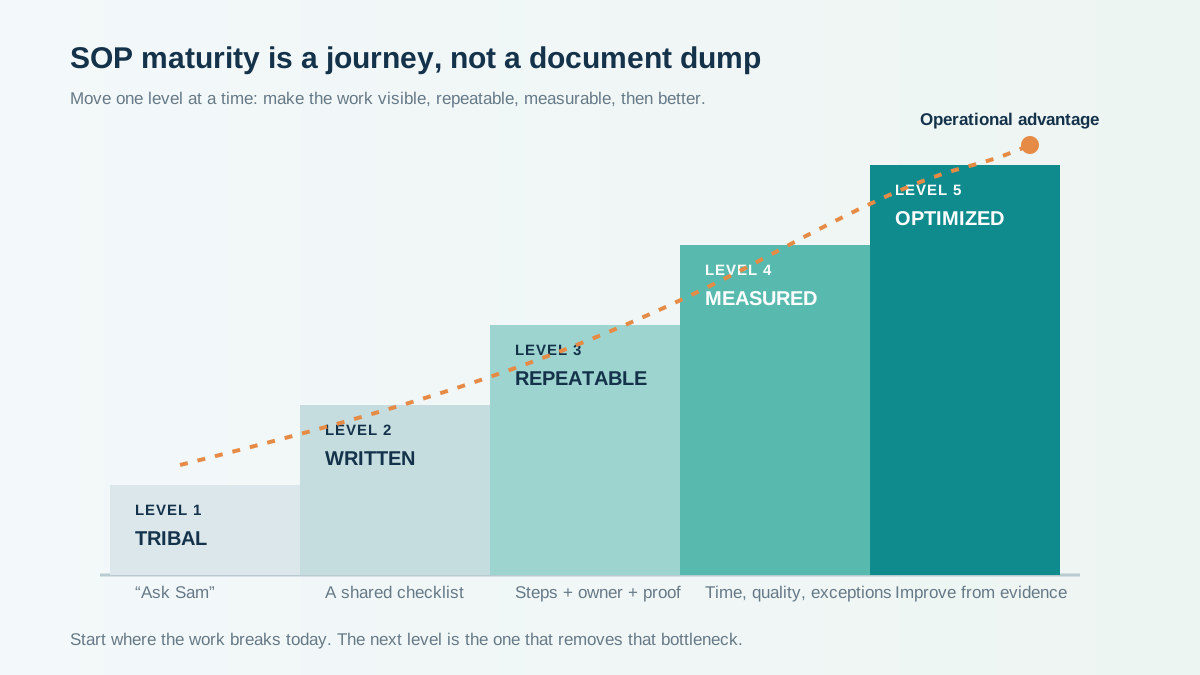
Here is how SOP maturity progresses:
Level 1 — Tribal knowledge. Processes exist in people's heads. New hires learn by shadowing. When someone leaves, the knowledge disappears.
Level 2 — Documented. SOPs exist in documents, but usage is inconsistent. No enforcement mechanism. Documents go stale.
Level 3 — Embedded. SOPs are linked to daily workflows and checklists. Team members encounter them during task execution, not during a separate knowledge search.
Level 4 — Enforced. Compliance is tracked. Evidence is required. Managers review completion rates weekly. Low compliance triggers investigation and improvement.
Level 5 — Optimized. SOPs are continuously improved based on completion data, error rates, and team feedback. Training time for new hires is measurable and decreasing. The SOP library is a competitive advantage — it is how the team scales without proportionally scaling headcount.
Most ecommerce teams are at Level 1 or 2. Getting to Level 3 takes one focused month. Getting to Level 4 takes a quarter. Level 5 is an ongoing practice.
For a deeper look at operational maturity stages, see the ecommerce operations maturity model.
Frequently Asked Questions
How many SOPs does an ecommerce team need?
Start with 4-6 covering your highest-frequency daily tasks: order processing, returns, listing creation, inventory updates. A mature team typically has 15-25 active SOPs. More than 30 suggests your SOPs are too granular — combine related micro-tasks into single procedures.
How long should an ecommerce SOP be?
Under two pages for execution SOPs. If a procedure needs more than 15 steps, break it into sub-procedures. Background context and training material should live in separate documents, not in the SOP itself.
Who should write ecommerce SOPs?
The person who performs the task writes the first draft. A manager or operations lead structures and formats it. This co-creation approach produces accurate, practical procedures that the team trusts.
How do I get my team to follow SOPs?
Do not mandate compliance — demonstrate value. Start with one SOP that solves a real pain point. Show measurable improvement. Then expand. Embed SOPs in daily checklists so following them requires less effort than skipping them.
Should SOPs include screenshots?
Yes, for every step that involves a screen interaction. Annotated screenshots with circles, arrows, and highlights reduce confusion and speed up task completion. Update screenshots immediately when interfaces change.
Keep Reading
- Ecommerce SOP Template — Ready-to-use templates for common ecommerce procedures
- Ecommerce Daily Operations Checklist — The daily tasks your SOPs should cover
- Ecommerce Standard Operating Procedures — Detailed SOP examples for multi-channel teams
- Ecommerce Operations Maturity Model — Where your operations stand on the maturity curve
Take the Next Step
Your SOPs are only as good as your enforcement system. If you want to see where your operations stand today — including SOP coverage and compliance — take the Ecommerce Operations Scorecard. It takes 2 minutes and shows you exactly what to fix first.
Find out what your operation is missing
Answer 10 questions. Get your ops score. Takes 2 minutes.
Take the Scorecard