

How strong are your e-commerce ops? Take the 2-min scorecard.
Score Your OpsConnecting marketplaces sounds simple. You have a Shopify store, a Shopee shop, a Lazada store, and a TikTok Shop. You want orders, inventory, and product data to flow between them without manual work. The promise is "connect once, sell everywhere." The reality is API rate limits, data format mismatches, sync delays, and a debugging session at 2 AM because your inventory counts diverged during a flash sale.
Marketplace integration is the plumbing of multi-channel ecommerce. Nobody notices it when it works. Everyone notices it when it breaks. And it breaks more often than the sales pitch suggests.
This guide covers the integration approaches — from manual to middleware to API-direct — the specific systems you need to connect, the common failures that cost sellers money, and the operational practices that keep integrations running reliably across Shopify, Shopee, Lazada, and TikTok Shop.
What Is Marketplace Integration?
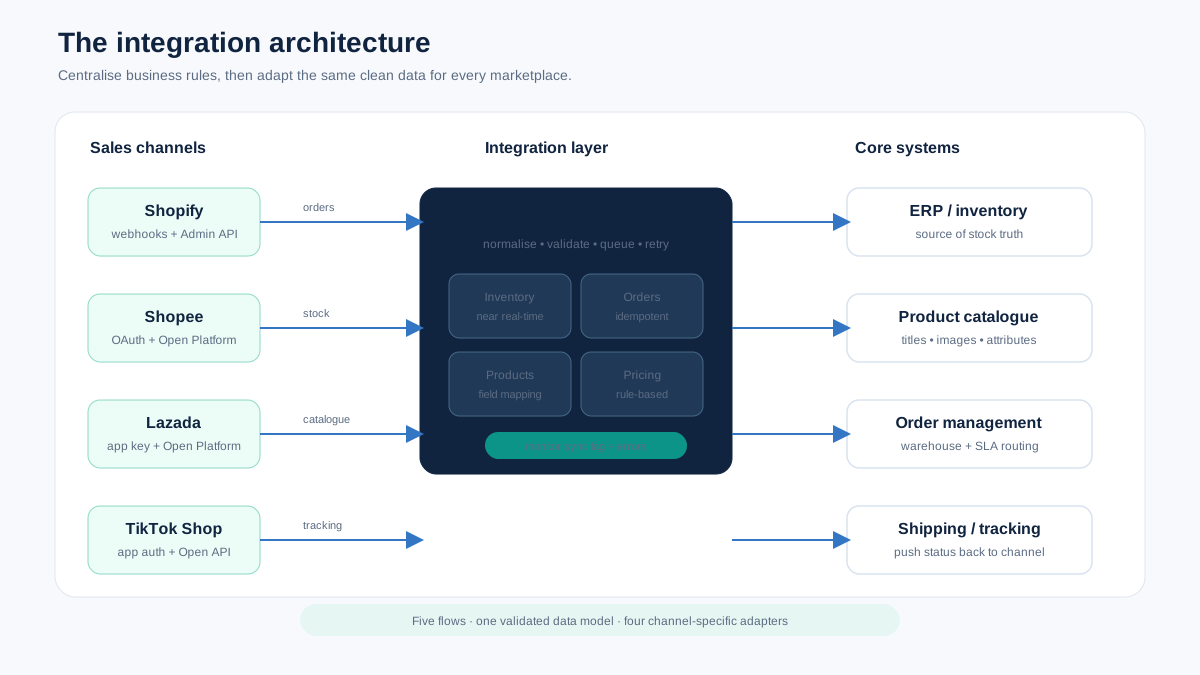
Marketplace integration is the process of connecting multiple sales channels to your core systems — inventory, orders, products, pricing, and shipping — so that data flows automatically between them.
Integration means your inventory count updates across all channels when a sale happens on one. It means an order placed on Shopee appears in your fulfillment workflow without manual entry. It means a price change in your central catalog propagates to every marketplace within minutes.
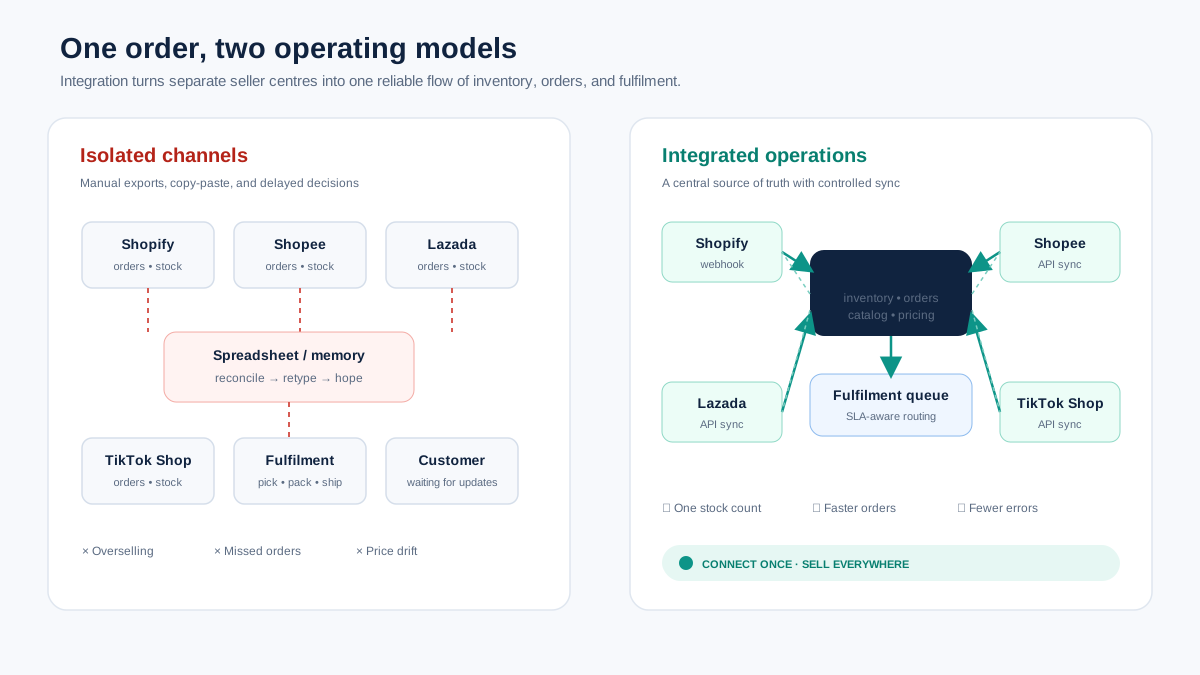
Without integration, you manage each channel in isolation. You log into Shopee Seller Centre, Lazada Seller Center, TikTok Shop Seller Center, and Shopify Admin separately. You update inventory manually in each one. You process orders from different dashboards. You maintain product data in multiple places.
That works for one channel with 20 products. It breaks at two channels with 100 products. It becomes impossible at four channels with 500 products.
Why Does Marketplace Integration Matter for Operations?
Integration eliminates the manual data transfer that causes 80% of multi-channel operational errors — wrong inventory counts, missed orders, inconsistent pricing, and duplicate shipments.
The operational errors that integration prevents:
Overselling. A product sells on Shopee and Lazada simultaneously. Without inventory sync, both orders get confirmed. You only have one unit. One order gets cancelled. You eat a penalty point.
Price inconsistency. You lower a price on Shopify but forget to update Shopee. A buyer notices the discrepancy and either files a complaint or you lose the sale. With integration, price changes propagate automatically.
Missed orders. You check Lazada at 9 AM and 5 PM. An order arrives at 10 AM. You do not see it until 5 PM. The SLA timer has been running for 7 hours. With integration, orders appear in your central system immediately.
Data entry errors. Every manual data transfer is an error opportunity. Copy a tracking number wrong, and the buyer never receives the shipment notification. Enter the wrong quantity, and inventory counts drift further.
These are not edge cases. They are the daily reality for multi-channel sellers who operate without integration. The cumulative impact — penalties, lost sales, customer complaints, team frustration — compounds monthly.
What Are the Main Integration Approaches?
The three approaches are manual (spreadsheets and copy-paste), middleware (third-party tools that connect channels), and API-direct (custom integrations built on marketplace APIs).
| Approach | Setup Cost | Maintenance | Reliability | Best For |
|---|---|---|---|---|
| Manual | None | High (daily labor) | Low (human error) | Under 50 SKUs, 1-2 channels |
| Middleware | $50-500/month | Low-Medium | Medium-High | 50-5,000 SKUs, standard needs |
| API-Direct | $5,000-50,000 setup | High (developer needed) | High (when maintained) | 5,000+ SKUs, custom requirements |
| Hybrid | Varies | Medium | High | Mixed needs across channels |
Manual Integration
You log into each channel separately, export data, reconcile in spreadsheets, and update manually. This works for very small operations and costs nothing beyond your time.
When it breaks: As soon as you add a third channel or exceed 100 SKUs. The time required for daily reconciliation exceeds what one person can handle reliably, and errors compound because human attention is finite.
Middleware Integration
Third-party tools connect to marketplace APIs on your behalf. You configure the connections, set sync rules, and the tool handles data transfer. Examples include multi-channel listing tools, inventory sync platforms, and order management systems.
Advantages: Faster setup than custom development. Pre-built connectors for major marketplaces. Regular updates when marketplace APIs change. Support team to troubleshoot issues.
Limitations: You are constrained by what the middleware supports. If your workflow needs custom logic — like different inventory allocation rules per channel or complex bundling — the tool may not support it. You also depend on the middleware provider's uptime and API update timeline.
API-Direct Integration
You build custom integrations using each marketplace's API. Shopee has the Shopee Open Platform, Lazada has the Lazada Open Platform, TikTok Shop has its API, and Shopify has the Admin API.
Advantages: Complete control. Custom logic. No middleware fees. Direct data flow.
Limitations: Requires developer resources. Each marketplace API has different authentication, rate limits, data formats, and versioning. API changes require maintenance. You own the uptime. For most sellers, this approach only makes economic sense above 5,000 SKUs or with truly unique operational requirements.
What Systems Need to Be Integrated?
The five critical integration points are inventory sync, order management, product data, pricing, and shipping — each with different sync frequency requirements.
| System | Sync Direction | Frequency Needed | Failure Impact |
|---|---|---|---|
| Inventory | Central to all channels | Real-time or near (under 15 min) | Overselling, penalties |
| Orders | Channels to central | Real-time or near (under 5 min) | Missed SLAs, late shipments |
| Product data | Central to channels | On change (push-based) | Inconsistent listings |
| Pricing | Central to channels | On change (push-based) | Margin loss, buyer complaints |
| Shipping/tracking | Central to channels | On event (when shipped) | Missing tracking, buyer inquiries |
Inventory Integration
The most critical integration point. Every minute of inventory sync delay during high-velocity selling is a risk of overselling.
How it works: A central inventory count is the source of truth. When a sale happens on any channel, the central count decreases, and the updated count pushes to all other channels. When new stock arrives, the central count increases, and availability updates everywhere.
Complexity factors: Multiple warehouses with different stock levels. Bundles and kits where selling one product reduces component inventory. Safety stock reserves per channel. Pre-allocated inventory for upcoming campaigns.
For a detailed look at inventory sync strategies, see the multi-channel inventory management guide.
Order Integration
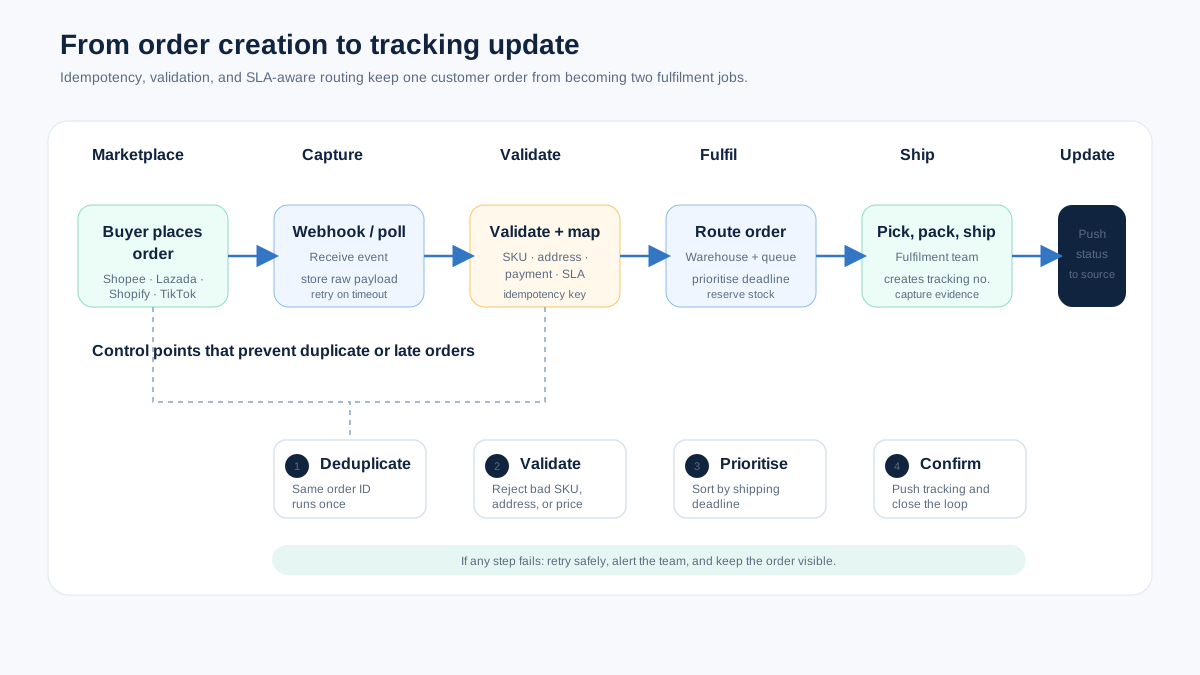
Orders from every channel need to flow into a single fulfillment workflow. This means standardizing order data (different marketplaces structure order data differently), routing orders to the correct warehouse, and pushing tracking numbers back to the originating marketplace.
The SLA challenge: Each marketplace has its own shipping SLA. Shopee and Lazada typically require shipment within 2 days. TikTok Shop varies by market. Missing SLAs triggers penalty points that affect seller health. Your order integration needs to surface SLA deadlines clearly so the fulfillment team prioritizes correctly.
Product Data Integration
Product titles, descriptions, images, and attributes need to propagate from your central catalog to each marketplace, adapted for platform-specific requirements. A title that works on Shopee needs to be different from the one on TikTok Shop — different character limits, different keyword strategies.
This is where integration intersects with multi-channel product listing best practices. The integration layer handles data transfer; your listing strategy determines what data to send to each channel.
How strong are your ecommerce operations? Score your ops in 2 minutes — Take the free scorecard. No signup required.
How Do You Integrate with Shopify?
Shopify integration uses the Admin API or pre-built app connectors, offering the most flexibility and the largest ecosystem of integration tools.
Shopify is typically the easiest channel to integrate because its API is well-documented, stable, and supported by thousands of third-party apps.
Integration options:
- Shopify App Store apps — Pre-built integrations for inventory sync, order management, and marketplace connections. Fastest setup. Limited customization.
- Shopify Admin API — REST and GraphQL APIs for custom integration. Full control over products, orders, inventory, and fulfillment.
- Shopify Flow — Workflow automation for Shopify Plus users. Trigger-based actions without code.
Common integration points:
- Inventory levels via Inventory API
- Orders via Orders API (with webhook for real-time)
- Products via Products API
- Fulfillment and tracking via Fulfillment API
Rate limits: Shopify's API uses a leaky bucket rate limiter. Standard plans get 2 requests per second. Shopify Plus gets 4-20 depending on plan. Plan your sync frequency around these limits.
How Do You Integrate with Shopee?
Shopee integration uses the Open Platform API with OAuth authentication, requiring app approval and supporting inventory, orders, products, and logistics.
Shopee's Open Platform provides APIs for all major integration needs. Access requires registering as a developer partner and getting your app approved.
Key APIs:
- Shop API — Store information and settings
- Product API — Create, update, and manage listings
- Order API — Retrieve and manage orders
- Logistics API — Shipping labels, tracking, logistics channels
- Discount API — Promotions and vouchers
Integration considerations for Shopee:
- Each country (Malaysia, Singapore, Indonesia, etc.) is a separate API endpoint
- Rate limits vary by API endpoint (typically 1-10 requests per second)
- OAuth tokens expire and need refresh logic
- Product category trees change quarterly — your integration needs to handle category ID updates
- Image uploads have size limits (2MB) and format requirements
The Shopee-specific challenge: Shopee's API responses can lag during mega-sale events. Your integration needs retry logic and error handling for timeout scenarios during 9.9, 11.11, and 12.12.
How Do You Integrate with Lazada?
Lazada integration uses the Open Platform with app key authentication, supporting a comprehensive set of APIs for products, orders, inventory, and logistics.
Lazada's API is comprehensive but has stricter requirements than Shopee for product data quality.
Key APIs:
- Product API — Create products with full attributes, manage listings
- Order API — Retrieve, pack, ship, and manage orders
- Finance API — Payout and transaction data
- Logistics API — Shipping and tracking management
Integration considerations for Lazada:
- Product creation requires complete and accurate attribute data — more fields than Shopee
- Image requirements are stricter (white background for main image, minimum resolution)
- Lazada's quality score affects listing visibility — integration should ensure all fields are populated
- Rate limits are enforced per app per seller, typically 100-500 requests per 10 seconds depending on API
How Do You Integrate with TikTok Shop?
TikTok Shop integration uses the TikTok Shop Open API with app authorization, supporting products, orders, logistics, and the affiliate marketplace.
TikTok Shop's API is newer and evolving faster than Shopee or Lazada. Expect more frequent API version changes and documentation updates.
Key APIs:
- Product API — List and manage products
- Order API — Order management and fulfillment
- Logistics API — Shipping and tracking
- Promotion API — Deals and discounts
- Affiliate API — Creator marketplace management
Integration considerations for TikTok Shop:
- API is still maturing — expect breaking changes with less advance notice than Shopee or Lazada
- Video content management is not API-driven (content creation remains manual)
- Product categories and policies are updated more frequently
- Fulfillment SLAs vary by market and may change with short notice
What Are the Most Common Integration Failures?
The top integration failures are inventory sync delays during peak traffic, order duplication from retry logic errors, and product data corruption from field mapping mistakes.
| Failure Type | Cause | Impact | Prevention |
|---|---|---|---|
| Inventory desync | Sync delay during high velocity | Overselling, cancelled orders | Real-time sync, safety stock buffers |
| Order duplication | Retry logic without idempotency | Double fulfillment, double charge | Idempotency keys on all API calls |
| Product data corruption | Wrong field mapping between systems | Wrong prices, descriptions, images | Automated validation post-sync |
| Auth token expiry | Missing refresh logic | Integration stops silently | Proactive token refresh, alerting |
| Rate limit throttling | Too many API calls too fast | Sync backlogs, delayed updates | Request queuing, exponential backoff |
| Category mapping break | Platform updates category tree | Listings rejected or miscategorized | Quarterly category mapping review |
| Webhook delivery failure | Network issues, endpoint downtime | Missed events, stale data | Webhook retry with dead letter queue |
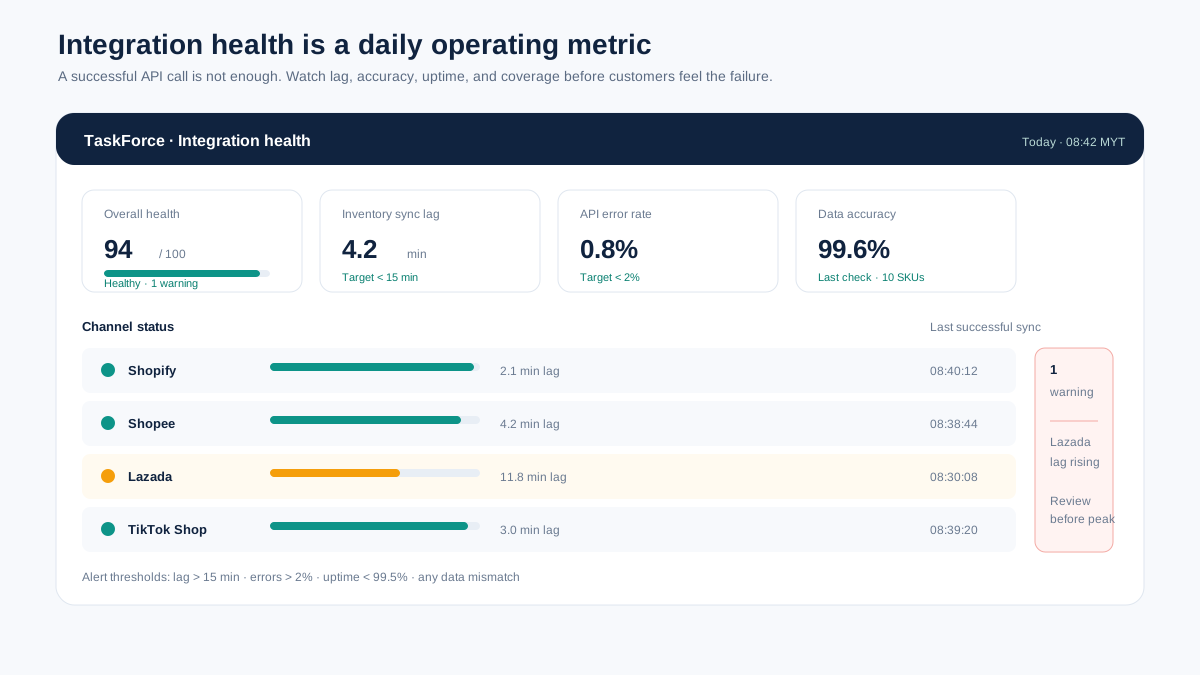
The failure that costs the most money: Silent inventory desync during a flash sale. Your integration appears to be working — no errors, no alerts — but sync is lagging by 30 minutes because the marketplace API is slow under campaign load. In those 30 minutes, you oversell 50 units across channels. Each cancelled order carries a penalty. The fix: monitor sync lag as a metric, not just sync success.
How Do You Monitor Integration Health?
Monitor four metrics continuously: sync lag (time between event and propagation), error rate (failed API calls), data accuracy (source vs destination match), and coverage (percentage of data flowing through integration vs manual).
| Metric | What to Track | Alert Threshold |
|---|---|---|
| Inventory sync lag | Time between sale and inventory update on other channels | Over 15 minutes |
| Order sync lag | Time between order creation and appearance in central system | Over 5 minutes |
| API error rate | Percentage of failed API calls | Over 2% |
| Data accuracy | Spot-check product data matches between systems | Any mismatch |
| Integration uptime | Percentage of time integration is operational | Below 99.5% |
| Sync coverage | Percentage of operations flowing through integration | Below 95% |
Weekly integration health check:
- Compare inventory counts between your central system and each marketplace for 10 random SKUs
- Review API error logs for patterns (specific endpoints failing, time-of-day patterns)
- Check sync lag trends — is it increasing over time?
- Verify that the last 50 orders all flowed through correctly
- Confirm tracking numbers were pushed back to all marketplaces
This check takes 30 minutes per week and prevents the slow drift that turns into a weekend emergency.
How Do You Choose the Right Integration Tool?
Choose based on three criteria: marketplace coverage (does it support your channels), data flow needs (real-time vs batch for each system), and operational features (does it extend beyond sync to include audits and monitoring).
| Tool Category | Examples | Marketplace Coverage | Cost Range |
|---|---|---|---|
| Multi-channel listing tools | Sellbrite, Listing Mirror | US-focused, limited SEA | $30-250/month |
| Inventory sync tools | Linnworks, Cin7 | Broad, varies by tool | $100-500/month |
| Operations platforms | TaskForce | Shopify, Shopee, Lazada, TikTok Shop | Contact for pricing |
| iPaaS/middleware | Celigo, MuleSoft | API-based, any channel | $500-5,000/month |
| Custom development | In-house or agency | Any | $5,000-50,000 setup |
For a comparison of specific multi-channel tools, see the best multi-channel ecommerce software guide.
The tool you choose should match your complexity level. A seller with 200 SKUs on Shopify and Shopee does not need iPaaS middleware. A seller with 5,000 SKUs across six channels and an ERP system does.
Frequently Asked Questions
How long does marketplace integration take to set up?
Middleware tools: 1-3 days for basic setup, 1-2 weeks for full configuration and testing. API-direct custom integration: 4-12 weeks depending on the number of channels and complexity. Budget an additional 2 weeks for testing before going live on any approach.
What happens when a marketplace API changes?
Middleware tools handle API changes for you — that is part of what you pay for. Custom integrations require your developer to update code when APIs change. Shopee and Lazada typically provide 30-90 days notice for major API changes. TikTok Shop provides less notice because its API is younger.
Can I integrate marketplaces without a developer?
Yes, using middleware tools with pre-built connectors. Most multi-channel listing and inventory sync tools require no code. You configure connections through a web interface. Custom logic or non-standard workflows may still require developer support.
What is the minimum integration I need for multi-channel selling?
Inventory sync. Everything else can be managed manually in the short term (though it is not ideal). If your inventory counts are wrong across channels, the resulting overselling and penalties will cost more than any integration tool.
How do I handle integration during mega-sale events?
Increase your safety stock buffers, reduce sync intervals if your tool supports it, monitor sync lag in real-time during the event, and have a manual fallback plan. During 11.11 and 12.12, marketplace APIs experience higher latency and occasional downtime — your integration needs to handle this gracefully.
Keep Reading
- Multi-Channel Inventory Management Guide — Deep dive on inventory sync across channels
- Best Multi-Channel Ecommerce Software — Tool comparison for multi-channel management
- Multi-Channel Product Listing Best Practices — Platform-specific listing optimization
- Ecommerce Automation Guide — Automating repetitive operations tasks
Take the Next Step
Integration is the foundation of multi-channel operations. But integration alone does not ensure operational excellence — it ensures data flow. The operational layer — audits, checklists, SOPs, and health monitoring — is what turns that data into consistent execution. If you want to see where your operations stand, take the Ecommerce Operations Scorecard. It takes 2 minutes and shows you exactly what to fix first.
Find out what your operation is missing
Answer 10 questions. Get your ops score. Takes 2 minutes.
Take the Scorecard