

How strong are your e-commerce ops? Take the 2-min scorecard.
Score Your OpsPlaybooks prevent operational amnesia. Every ecommerce team eventually discovers that the person who "just knows" how everything works takes a sick day at the worst possible time. An ecommerce operations playbook captures that knowledge in a format anyone on your team can follow — SOPs, checklists, escalation paths, and review cadences bundled into a single reference document.
This guide walks through building one from scratch, section by section, for teams selling across Shopify and Southeast Asian marketplaces like Shopee, Lazada, and TikTok Shop.
What Is an Ecommerce Operations Playbook?
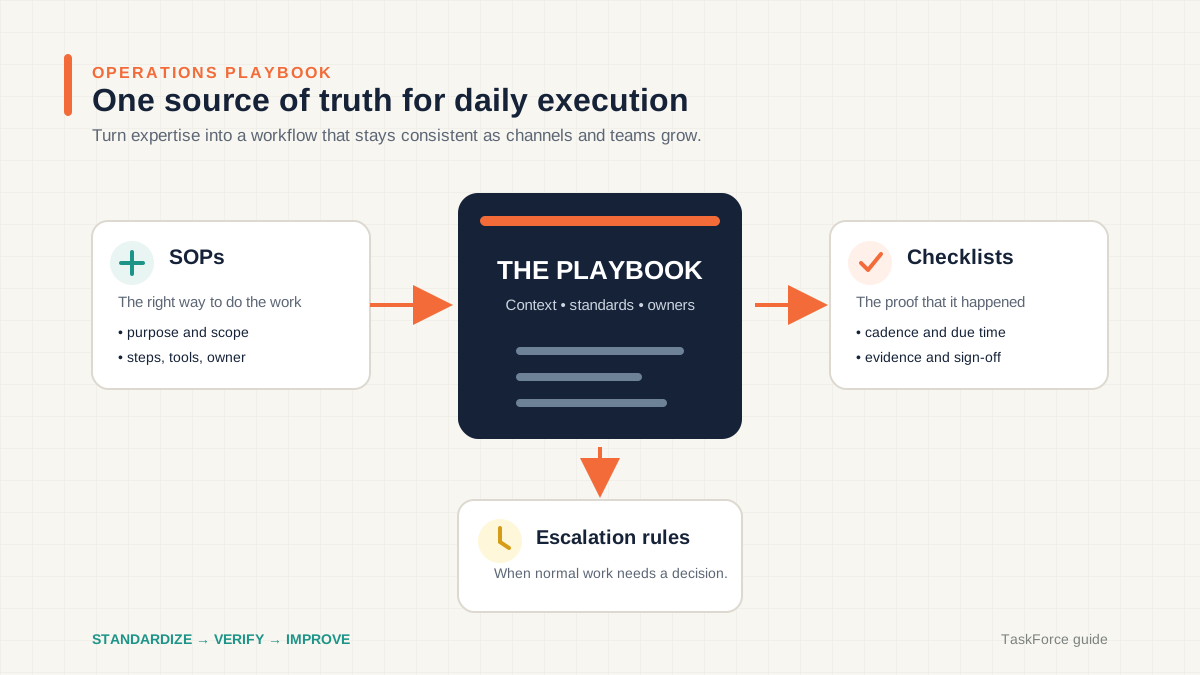
An ecommerce operations playbook is a structured document — or set of documents — that defines how your team handles every recurring operational process, from order fulfillment to marketplace compliance, with clear ownership, step-by-step procedures, and escalation rules.
Think of it as the operating manual for your business. Not a strategy document. Not a wiki full of tribal knowledge nobody reads. A playbook is prescriptive: it tells people exactly what to do, when to do it, and what to do when things go wrong.
A well-built playbook typically includes four layers:
- SOPs (Standard Operating Procedures) — Detailed step-by-step instructions for specific tasks
- Checklists — Daily, weekly, and monthly task lists that ensure nothing gets skipped
- Escalation procedures — Decision trees for handling exceptions and emergencies
- Review cadences — Schedules for auditing and updating the playbook itself
Teams without a playbook rely on memory and chat threads. That works with two people and one sales channel. It breaks with four people and three channels.
Why Do Ecommerce Teams Need a Playbook?
Because the cost of inconsistency compounds faster than the cost of building the system.
A missed Shopee order SLA costs you penalty points. A pricing error on Lazada during a flash sale costs you margin. A warehouse team that packs TikTok Shop orders without the required branded insert costs you seller health metrics. Each one is small. Together, they erode profitability and seller ratings over months.
Here is what changes when you have a playbook:
| Without a Playbook | With a Playbook |
|---|---|
| New hires shadow someone for weeks | New hires follow documented procedures from day one |
| Errors repeat because fixes live in chat history | Root causes get fixed in the SOP permanently |
| Channel-specific rules live in one person's head | Rules are documented per marketplace, per process |
| Escalations depend on who's online | Escalation paths are predefined with thresholds |
| Audits happen when someone remembers | Audits run on a schedule with assigned owners |
| Process improvements are ad hoc | Review cadences surface improvement opportunities |
The playbook is not overhead. It is the foundation that lets you add channels, hire team members, and survive peak seasons without proportionally increasing chaos.
What Should an Operations Playbook Include?
Every recurring process your team performs, documented at the level of detail a competent new hire would need to execute it without asking questions.
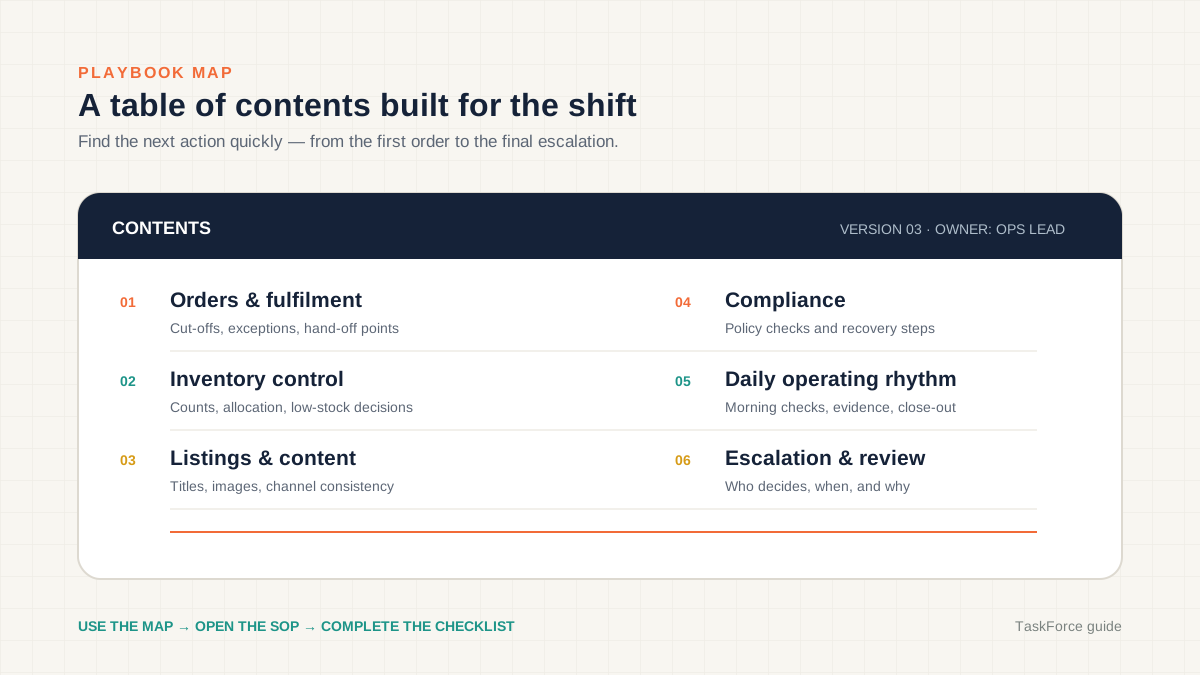
The exact sections depend on your business, but most ecommerce operations playbooks cover these areas:
Order Management
How orders flow from marketplace to fulfillment. Include channel-specific rules — Shopee's ship-by deadlines differ from Lazada's, and Shopify orders may route to different warehouses. Document the entire order management process flow from capture through delivery confirmation.
Inventory and Stock Control
How you receive, count, sync, and replenish inventory. This section should cover cycle count procedures, reorder point calculations, multi-channel sync rules, and what happens when stock discrepancies surface. The ecommerce daily operations checklist is a good starting point for the daily rhythm.
Listing Management
How listings get created, updated, and audited across channels. Include image standards, title formats, required attributes per marketplace, and the compliance rules that trigger penalties. Content drift — where the same product has different descriptions on different channels — is one of the most common operational problems for multi-channel sellers.
Customer Service
Response time targets per channel, escalation triggers, refund authority levels, and templates for common scenarios. Marketplace seller health metrics penalize slow responses, so this section needs channel-specific SLAs.
Returns and Refunds
The full lifecycle: return request received, approval criteria, shipping logistics, quality inspection, restocking or disposal, refund processing, and inventory adjustment. Each marketplace handles returns differently.
Marketplace Compliance
Seller health thresholds, prohibited content rules, listing requirements, and penalty structures for each channel. This is the section that prevents your Shopee account from getting suspended because someone uploaded a product image with a watermark.
How Do You Write Effective SOPs?
Write SOPs for the person who will follow them at 9 AM on a Monday — not for the person who already knows how to do the task.
SOPs are the building blocks of your playbook. A bad SOP is a wall of text nobody reads. A good SOP is a numbered sequence that someone can follow while doing the work.
SOP Structure
Every SOP should follow this format:
- Title — What this procedure covers (e.g., "Process Shopee Return Request")
- Purpose — Why this procedure exists (one sentence)
- Scope — When this SOP applies and when it does not
- Owner — Who is responsible for executing and maintaining this SOP
- Prerequisites — What access, tools, or information the person needs before starting
- Steps — Numbered, sequential, specific actions
- Exception handling — What to do when the standard steps don't apply
- Verification — How to confirm the procedure was completed correctly
- Version history — When it was last updated and what changed
Writing Tips
Be specific about where to click. "Update the order status" is not an SOP step. "In Shopee Seller Center, navigate to My Sales > To Ship, select the order, click Arrange Shipment, and enter the tracking number" is an SOP step.
Include screenshots. Marketplace seller centers change their UI regularly. Screenshots with annotations reduce errors and make updates obvious when the UI changes.
Write for the exception, not just the happy path. Most SOP failures happen when reality doesn't match the documented steps. Add conditional branches: "If the customer selected the wrong return reason, do X instead of Y."
One SOP per process. Don't combine "Process Shopee Order" and "Process Lazada Order" into one document. The steps differ enough that combining them creates confusion. Link related SOPs instead.
The SOP library in TaskForce lets you version SOPs, link them to checklist tasks, and roll back when an update causes problems — which is far more practical than managing SOPs in Google Docs.
How Do You Build Operational Checklists?
Checklists convert SOPs from reference material into daily action items with accountability and evidence.
SOPs tell people how to do something. Checklists tell people what to do today and track whether it got done. The two work together: each checklist item links to the relevant SOP for detailed instructions.
Daily Checklist Structure
A daily operations checklist for a multi-channel ecommerce team typically covers:
| Time Block | Checklist Items | Verification |
|---|---|---|
| Morning (start of shift) | Check all channels for new orders, review seller health dashboards, verify inventory sync completed overnight, check for critical alerts | Dashboard screenshot or system confirmation |
| Mid-morning | Process and ship orders within SLA, respond to customer inquiries, resolve flagged listings | Order count and response time logged |
| Afternoon | Run inventory reconciliation, process returns, update listings as needed, check campaign status | Reconciliation report |
| End of day | Verify all orders shipped, update tracking numbers, log exceptions, handoff notes for next shift | Completion confirmation with notes |
Channel-Specific Checklists
Each marketplace has unique daily requirements. Your Shopee checklist includes checking chat response rates and processing Shopee-guaranteed returns. Your Lazada checklist includes monitoring seller score components. Your TikTok Shop checklist includes reviewing live commerce metrics if you stream.
Don't build one generic checklist. Build one per channel plus one for cross-channel tasks like inventory sync and pricing consistency.
Evidence Requirements
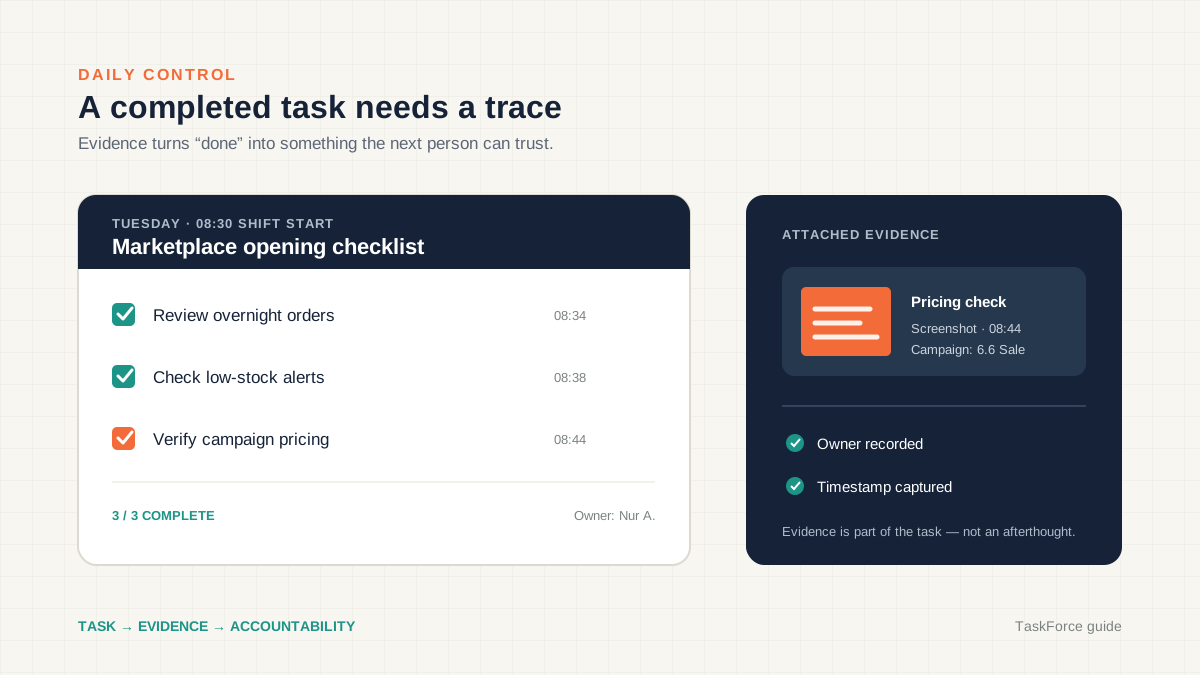
The most effective checklists require proof of completion, not just a checkbox. This means attaching a screenshot of the seller center dashboard, logging the number of orders processed, or linking to the reconciliation report.
Why? Because checkboxes get ticked without the work getting done. Evidence-based verification catches shortcuts before they become habits. Speed-run detection — flagging when a 15-item checklist gets completed in 90 seconds — is another layer that keeps checklists honest.
How strong are your ecommerce operations? Score your ops in 2 minutes — Take the free scorecard. No signup required.
How Do You Design Escalation Procedures?
Escalation procedures remove decision-making from crisis moments by pre-defining who handles what, at what threshold, with what authority.
Every playbook needs a section on what happens when things go wrong. Not "contact the manager." Specific, tiered escalation paths based on severity and type.
Escalation Tiers
| Tier | Trigger | Handler | Response Time | Authority |
|---|---|---|---|---|
| Tier 1 | Single order issue, routine customer complaint | Operations staff | Within SLA | Refund up to $50, standard resolution |
| Tier 2 | Seller health metric approaching threshold, pricing error on live listings, stock discrepancy >5% | Team lead | Within 1 hour | Pause listings, override pricing, escalate to marketplace |
| Tier 3 | Account suspension risk, system outage, bulk order failure, security incident | Operations manager | Within 15 minutes | Full account control, vendor contact, incident response |
Escalation Rules
- Never skip tiers — Tier 1 handles Tier 1 problems. Escalating everything to the manager defeats the purpose.
- Define the trigger, not the judgment — "Shopee shop rating drops below 4.5" is a trigger. "When things look bad" is not.
- Include contact methods — Phone for Tier 3. Slack message for Tier 2. Task assignment for Tier 1.
- Document resolution — Every escalation gets a post-mortem note added to the playbook. If the same issue escalates three times, the SOP needs updating.
Marketplace-Specific Escalations
Each marketplace has specific situations that require immediate action:
Shopee: Late shipment penalty approaching daily threshold, chat response rate below 90%, listing removed for policy violation.
Lazada: Seller score component dropping below threshold, campaign cancellation risk, product recall notice.
TikTok Shop: Live stream policy violation flag, sample order dispute, content moderation takedown.
Shopify: Payment gateway failure, theme update breaking checkout, bulk discount code leak.
Map each of these to a specific escalation tier and handler. When the situation occurs, the person on shift opens the playbook and follows the procedure instead of panicking in a group chat.
How Do You Keep the Playbook Updated?
A playbook that was accurate six months ago is a liability, not an asset. Build review cycles into the playbook itself.
This is where most playbooks die. Someone builds a comprehensive document, the team uses it for a few weeks, then the marketplace changes its UI, a new process gets added informally, and within three months the playbook describes a business that no longer exists.
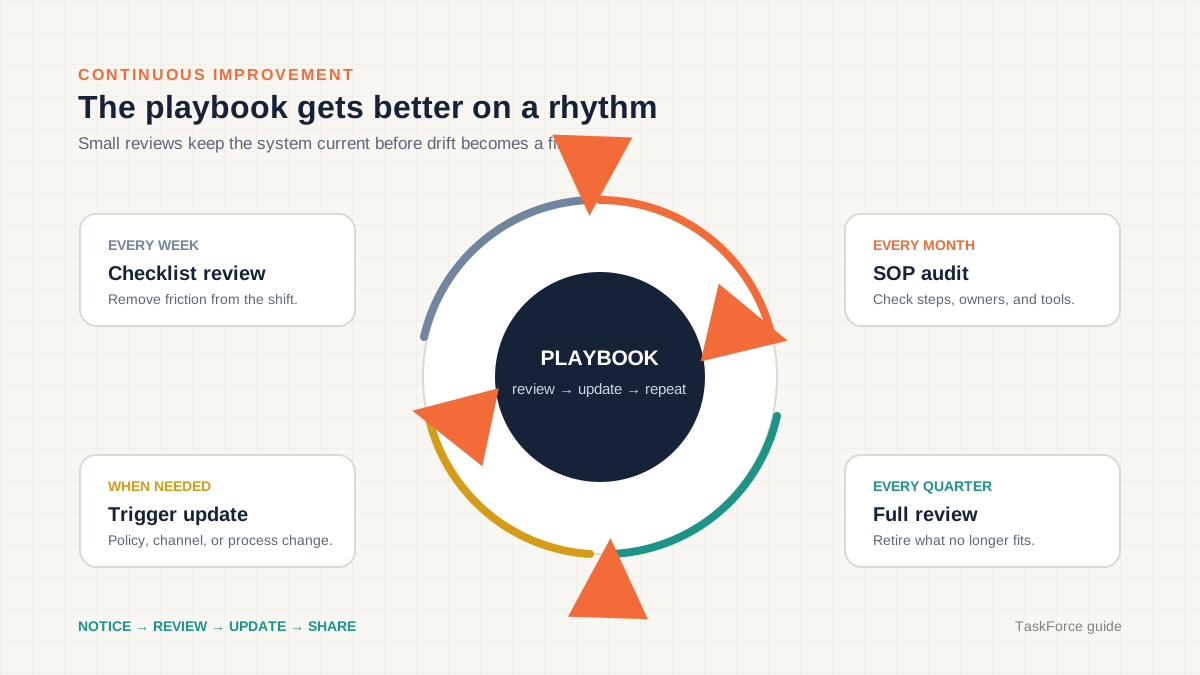
Review Cadences
| Cadence | What Gets Reviewed | Owner |
|---|---|---|
| Weekly | Checklist completion rates, escalation log, new exceptions encountered | Team lead |
| Monthly | All SOPs used that month — are steps still accurate? Any missing procedures? | Process owners |
| Quarterly | Full playbook audit — coverage gaps, outdated sections, alignment with current channels and team | Operations manager |
| Trigger-based | After any marketplace policy change, new channel onboarding, or major incident | Relevant SOP owner |
Version Control
Every SOP update should be versioned. Not "I changed the document." A version entry with the date, what changed, why it changed, and who approved the change. This matters because:
- You can roll back if an update causes problems
- New team members can see the evolution of a process
- Audit trails prove compliance for marketplace requirements
Tracking SOP versions in a shared drive is painful. Tools like TaskForce that include built-in SOP versioning with rollback make this manageable at scale.
Feedback Loops
The people executing the SOPs are the best source of updates. Build a lightweight feedback mechanism:
- Every checklist item has a "flag for review" option
- Flagged items get reviewed in the weekly meeting
- Approved changes get implemented in the SOP within 48 hours
- The team gets notified of the update
This keeps the playbook alive without requiring a dedicated documentation role.
How Do You Roll Out a Playbook to Your Team?
Roll out one section at a time, starting with the process that causes the most errors, not the one that's easiest to document.
A common mistake is building the entire playbook in isolation and then dropping it on the team in one shot. This fails because people can't absorb 50 SOPs at once, and because playbooks built without operator input contain blind spots.
Rollout Sequence
- Pick the most painful process — Where do errors cluster? Where do escalations repeat? Start there.
- Draft the SOP with the person who does the work — Not for them. With them. They know the exceptions and shortcuts that you don't.
- Test with a second person — Have someone unfamiliar with the process follow the SOP. Every question they ask reveals a gap in the document.
- Attach it to a checklist — The SOP becomes real when it's linked to a daily task that someone is accountable for completing.
- Run it for two weeks — Collect feedback, fix gaps, update the SOP.
- Move to the next process — Repeat.
This approach takes longer than a documentation sprint, but it produces playbooks that people actually follow.
Training vs. Documentation
A playbook is not a training program. Training teaches people why things work the way they do. The playbook tells them what to do. You need both.
For new hires: walk through the playbook section by section during their first week, with the experienced team member demonstrating each SOP. Then have the new hire execute the SOPs independently while the experienced person observes. After one week, the new hire should be able to follow the playbook without supervision for routine tasks.
For existing team members transitioning to a new playbook: focus on what changed and why. Don't re-train them on things they already know. Highlight the new escalation paths, the evidence requirements, and the review cadences.
What Tools Support an Operations Playbook?
The best playbook tool is the one your team will actually open every morning — which means it needs to live where the work happens, not in a separate documentation system.
| Tool Category | Examples | Best For | Limitation |
|---|---|---|---|
| Document-based | Google Docs, Notion, Confluence | Initial drafting, rich formatting | No task tracking, no verification, version control is manual |
| Project management | Asana, Monday, ClickUp | Task assignment, deadlines | SOPs are separate from tasks, no evidence collection |
| Wiki systems | Notion, GitBook, Slite | Organizing and searching SOPs | Read-only — no daily execution layer |
| Operations platforms | TaskForce | SOPs + checklists + verification + audits in one system | Purpose-built for ecommerce ops |
The gap in most setups is the connection between the SOP (how to do it) and the checklist (did you do it today). When SOPs live in Google Docs and checklists live in a spreadsheet, the link between them is a copy-pasted URL that nobody clicks.
An ecommerce operations playbook works best when the SOP is viewable directly within the checklist task — so the person completing the task can reference the procedure without switching tools.
For teams managing multiple marketplace channels, the playbook tool also needs to support channel-specific checklists. Your Shopee daily checklist is different from your Shopify daily checklist. The ecommerce operations KPIs you track per channel feed back into the playbook review cycle.
What Does a Finished Playbook Look Like?
Here is the table of contents for a mid-size ecommerce operation selling on Shopify, Shopee, and Lazada with a team of five:
Section 1: Company Overview — Channels, team roles, operating hours, communication tools
Section 2: Order Management — SOPs per channel for order processing, cancellations, partial fulfillment, COD handling
Section 3: Inventory — Receiving, cycle counts, sync procedures, reorder process, discrepancy resolution
Section 4: Listings — Creation standards, image requirements per channel, attribute mapping, content drift detection
Section 5: Customer Service — Response templates, escalation tiers, refund authority matrix, marketplace chat SLAs
Section 6: Returns — Per-channel return procedures, inspection criteria, restocking rules, refund timelines
Section 7: Marketplace Compliance — Seller health targets, prohibited content rules, penalty avoidance procedures per channel
Section 8: Daily Checklists — Per-channel daily task lists with evidence requirements and SOP links
Section 9: Escalation Procedures — Three-tier escalation matrix with triggers, handlers, and authority levels
Section 10: Review Schedule — Weekly, monthly, quarterly review owners and procedures
Appendix: SOP Index — Alphabetical list of all SOPs with version numbers and last-reviewed dates
This is not a 200-page document. Each SOP is one to two pages. The total playbook for a five-person team is typically 40-60 pages, most of which are step-by-step procedures with screenshots.
Common Playbook Mistakes
Writing for executives instead of operators. The audience is the person doing the work at 9 AM, not the person reviewing metrics at 5 PM.
Documenting everything at once. Build incrementally. Start with the process that causes the most errors.
No ownership. Every SOP needs a named owner who is responsible for keeping it accurate. "The team" is not an owner.
No review cadence. A playbook without scheduled reviews decays within months. Build the review into the playbook itself.
Ignoring marketplace differences. A generic "process an order" SOP doesn't work when Shopee, Lazada, and Shopify each have different flows, SLAs, and penalty structures.
Separating the playbook from daily work. If the playbook lives in a document nobody opens, it doesn't exist. Embed it in the tools your team uses every day.
Frequently Asked Questions
How long does it take to build an ecommerce operations playbook?
Plan for 2 to 4 weeks to build the first version covering your core processes, starting with the 5 to 6 workflows that cause the most errors. The playbook is never truly finished — it evolves with your business. Teams that build incrementally report 67% fewer operational errors within the first quarter compared to those that skip documentation entirely.
What's the difference between a playbook and an SOP?
An SOP is a single procedure for a single task — like processing a Shopee return. A playbook is the collection of all SOPs plus checklists, escalation procedures, review schedules, and the organizational structure that ties them together. A typical mid-size ecommerce team needs 10 to 15 SOPs organized into one playbook of roughly 40 to 60 pages.
Do I need a playbook if I'm the only person running operations?
Yes — but a simpler one. Document your top 5 processes now so that when you hire your first operations person, onboarding takes days instead of months. Solo operators also benefit from checklists because they prevent the "I forgot to check seller health today" problem that compounds into marketplace penalties over 30 to 60 days.
How do I get my team to actually use the playbook?
Link SOPs to daily checklists that are part of their workflow. Teams with embedded SOP-linked checklists achieve 72% adoption versus 31% for standalone documents, according to Deloitte research. If the playbook is a separate document they need to remember to open, they will not use it. Evidence requirements and completion tracking add accountability. Read more in the daily operations checklist guide.
Should I use a template or build from scratch?
Start with a template for structure, then customize every SOP for your specific channels, products, and team. Generic templates miss marketplace-specific requirements that vary across over 15 rule categories on platforms like Shopee and Lazada. Shopify's operations resources provide useful starting frameworks, and marketplace-specific guidance is available from Shopee's Seller Education Hub.
Keep Reading
- Ecommerce Daily Operations Checklist — The daily task list that keeps multi-channel operations running
- Ecommerce Operations KPIs — 15 metrics that tell you whether your playbook is working
- Ecommerce Compliance Guide — Marketplace rules and how to avoid penalties
- Order Management Process Flow — End-to-end order processing for multi-channel sellers
Find out what your operation is missing
Answer 10 questions. Get your ops score. Takes 2 minutes.
Take the Scorecard