

How strong are your e-commerce ops? Take the 2-min scorecard.
Score Your OpsThree people run the entire operation. That's normal for most ecommerce businesses doing $30K-$200K per month across multiple marketplaces. The founder handles strategy and escalations. One person manages listings and customer service. Another handles fulfillment and inventory.
The problem isn't the team size. It's that every new channel, every new campaign, and every new product adds work without adding headcount. When the workload outpaces the team's capacity, the response is almost always the same: work longer hours. That's a burnout trajectory, not a productivity strategy.
Ecommerce team productivity isn't about hustle culture. It's about removing the structural waste — the duplicate data entry, the channel-switching overhead, the manual processes that should have been automated three months ago — so your small team can focus on work that actually moves revenue.
This guide covers the specific workflows, management practices, and tool strategies that let small ecommerce teams run multi-channel operations without burning out or breaking down.
What Does Ecommerce Team Productivity Actually Mean?
Ecommerce team productivity is the ratio of revenue-generating output to team hours invested. High-productivity teams handle more channels, more SKUs, and more orders per person — not by working harder, but by eliminating operational waste.
Productivity in ecommerce operations looks different from generic office productivity advice. You can't "eat the frog" when Shopee's SLA clock is ticking on 47 unshipped orders. Time-blocking breaks down when marketplace chat response rates require monitoring throughout the day.
Ecommerce-specific productivity is about three things:
- Throughput — orders processed, listings managed, customer inquiries resolved per team member per day
- Error rate — wrong shipments, listing mistakes, pricing errors, missed SLA deadlines per 1000 actions
- Cycle time — how long it takes from order received to shipped, from new product to live listing, from customer complaint to resolution
A productive team isn't just fast. It's fast and accurate. The team that ships 200 orders a day with a 5% error rate is less productive than the team that ships 150 orders a day with a 0.5% error rate, because those errors generate returns, refund processing, customer complaints, and seller score damage.
Understanding what ecommerce operations encompasses helps teams see all the areas where productivity improvements compound.
Why Are Ecommerce Teams So Stretched?
Multi-channel selling multiplies work non-linearly. Each new platform adds unique requirements that can't be copy-pasted, and the coordination overhead between channels grows faster than the channel count.
Let's quantify it. Here's what a typical three-person team's daily task load looks like on one channel versus four:
| Daily Task | 1 Channel | 4 Channels | Multiplier |
|---|---|---|---|
| Check and respond to customer messages | 30 min | 2.5 hrs | 5x |
| Monitor seller health metrics | 10 min | 45 min | 4.5x |
| Process and ship orders | 2 hrs | 5 hrs | 2.5x |
| Update inventory counts | 15 min | 1.5 hrs (with reconciliation) | 6x |
| Manage promotions and pricing | 30 min | 2.5 hrs | 5x |
| Update product listings | 45 min | 3 hrs | 4x |
| Review returns and refunds | 20 min | 1.5 hrs | 4.5x |
| Total | ~4.5 hrs | ~17 hrs | 3.8x |
Four channels doesn't mean 4x the work. It means 3.8x the work minimum, because each channel has unique interfaces, rules, and formats. The coordination tax — making sure the same product information, the same inventory count, and the same pricing is consistent across all channels — is what pushes it beyond linear scaling.
This math explains why teams feel overwhelmed even when individual channel volumes seem manageable.
How Should You Structure an Ecommerce Operations Team?
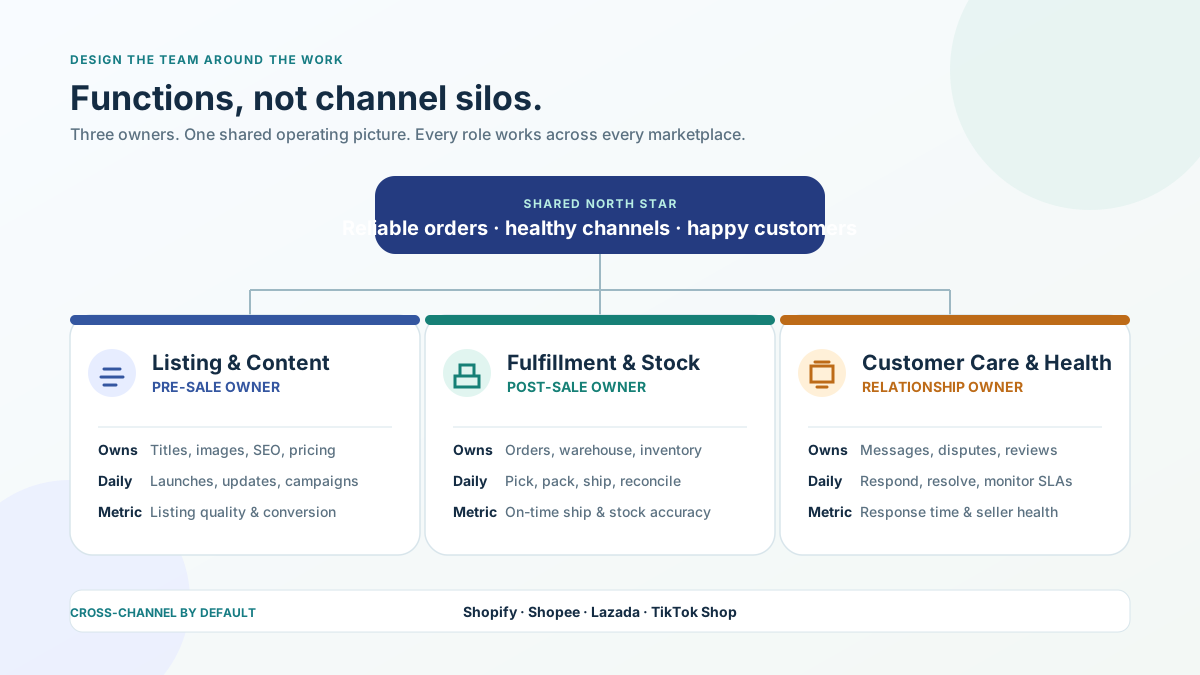
Structure roles around functions (listings, fulfillment, customer service), not around channels. Channel-based roles create silos and make cross-channel coordination impossible.
The instinct is to assign people to channels: "You handle Shopee, I'll handle Lazada." This is the worst possible team structure for multi-channel ecommerce. Here's why:
- Knowledge silos — The Shopee person doesn't know how to handle Lazada issues. When they're sick, Lazada operations stop.
- Inconsistency — Each person manages their channel differently. Listing quality, response tone, and process execution vary.
- No cross-channel coordination — Pricing, inventory, and promotions across channels need to be coordinated. Channel silos make this harder.
Function-Based Team Structure
| Role | Responsibilities | Daily Priorities |
|---|---|---|
| Listing & Content Manager | Product listings across all channels, SEO, images, pricing | Listing updates, new product launches, campaign pricing |
| Fulfillment & Inventory Lead | Order processing, warehouse, inventory sync, returns | Ship orders, reconcile inventory, process returns |
| Customer Service & Marketplace Health | All customer communications, seller metrics, reviews | Chat responses, dispute handling, health score monitoring |
Each role owns a function across all channels. The Listing Manager knows how titles work on Shopify AND Shopee AND Lazada. The Fulfillment Lead knows every carrier's cutoff time across every platform.
For teams smaller than three, combine roles. A two-person team typically splits: one person handles everything pre-sale (listings, pricing, promotions), the other handles everything post-sale (orders, fulfillment, customer service, returns).
What Workflows Eliminate the Most Waste?
Batching by task type, time-boxing channel checks, and establishing "processing windows" for orders eliminate the context-switching tax that kills ecommerce team productivity.
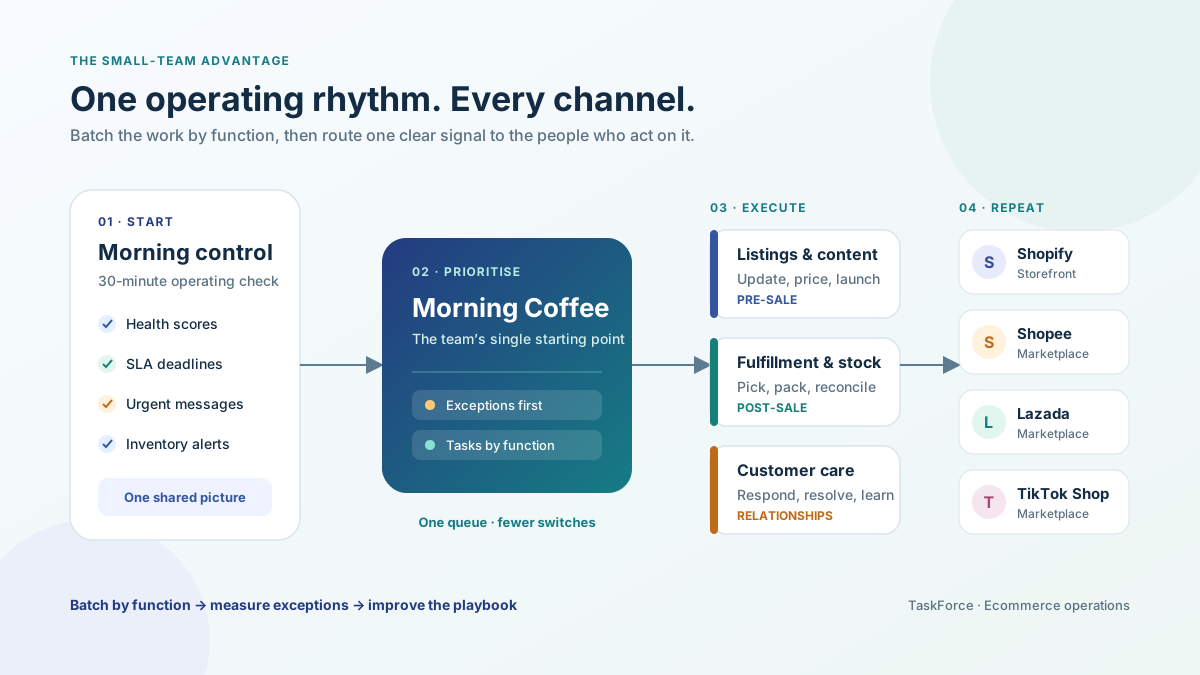
Workflow 1: Morning Operations Check (30 minutes)
Start every day with the same routine, in the same order:
- Seller health scores across all channels (5 min) — catch any metric approaching penalty territory
- Overnight orders count and SLA deadlines (5 min) — know what needs to ship today
- Customer messages requiring urgent response (10 min) — handle escalations, queue standard responses
- Inventory alerts — low stock, overselling incidents, sync failures (5 min)
- Yesterday's fulfillment results — late shipments, errors, returns received (5 min)
This 30-minute check replaces the habit of randomly switching between seller centers throughout the morning. You get a complete operational picture before starting execution.
Workflow 2: Batched Order Processing
Instead of processing orders as they arrive, set two or three processing windows per day:
- Window 1: 9 AM — Process all overnight orders
- Window 2: 1 PM — Process morning orders
- Window 3: 4 PM — Final processing before carrier cutoffs
Batching reduces context-switching (you're in "fulfillment mode" for 60-90 minutes instead of 15 minutes here and there all day). It also enables batch picking in the warehouse, which is 2-3x faster than individual order picking.
Workflow 3: Batched Customer Service
Respond to customer messages in dedicated blocks, not in real-time:
- Block 1: 9:30 AM — First responses after overnight messages
- Block 2: 12:30 PM — Midday response sweep
- Block 3: 4:30 PM — End-of-day sweep, prioritize any approaching SLA deadlines
This maintains marketplace response rate metrics (most require response within 12-24 hours) while preventing the constant interruption of checking messages every 20 minutes.
Workflow 4: Weekly Listing Audit
Dedicate one morning per week to reviewing listing health:
- Check for listings with declining conversion rates
- Update pricing for any SKUs where margins have shifted
- Review competitor positioning on top SKUs
- Update images or descriptions for seasonal relevance
- Fix any listing errors flagged by marketplace health checks
Doing this weekly prevents the accumulation of listing debt — small problems that compound into significant revenue loss over time.
How strong are your ecommerce operations? Score your ops in 2 minutes — Take the free scorecard. No signup required.
What Tools Actually Improve Ecommerce Team Productivity?
Tools improve productivity only when they eliminate manual steps that consume significant time. The highest-ROI tools for ecommerce teams are inventory sync, centralized order management, and automated customer service routing.
Not every tool is worth the investment. Here's a framework for evaluating whether a tool will actually improve your team's productivity:
The 30-Minute Rule: If a manual task takes more than 30 minutes per day, and a tool can reduce it to under 10 minutes, the tool pays for itself within a month for most team sizes.
Tool Priority Matrix
| Tool Category | Time Saved/Day | Cost Range | Implement When... |
|---|---|---|---|
| Inventory sync | 1-3 hours | $50-$300/month | You sell on 2+ channels |
| Centralized order management | 1-2 hours | $100-$500/month | You process 50+ orders/day across channels |
| Customer service helpdesk | 1-2 hours | $30-$150/month | You handle 30+ messages/day across channels |
| Automated label printing | 30-60 min | $0-$100/month | You ship 30+ orders/day |
| Listing management | 30-90 min | $50-$300/month | You manage 100+ SKUs across 3+ channels |
| Marketplace analytics | 30-60 min | $50-$200/month | You need cross-channel performance comparison |
The temptation is to buy tools for every problem. Resist it. Every tool has an onboarding cost, a maintenance cost, and a context-switching cost. A team with three well-integrated tools outperforms a team with eight tools that don't talk to each other.
For a complete framework on what to automate and what to keep manual, see our ecommerce automation guide.
How Do You Manage an Ecommerce Team Without Micromanaging?
Replace micromanagement with measurement. When every team member has clear daily targets and real-time visibility into their metrics, management becomes exception-handling rather than constant oversight.
Define Daily Targets per Role
Each role should have 3-5 measurable daily targets:
Fulfillment & Inventory Lead:
- All orders processed and shipped before 4 PM carrier cutoff
- Zero overselling incidents
- Inventory sync verified across all channels
- Returns processed within 24 hours of receipt
Customer Service & Marketplace Health:
- All customer messages responded to within 4 hours
- Seller health scores checked and documented every morning
- Dispute resolution initiated within 24 hours
- Zero SLA breaches
Listing & Content Manager:
- New products listed within 48 hours of receiving assets
- Weekly listing audit completed every Monday
- Campaign pricing updated 48 hours before promotion start
- Zero pricing errors
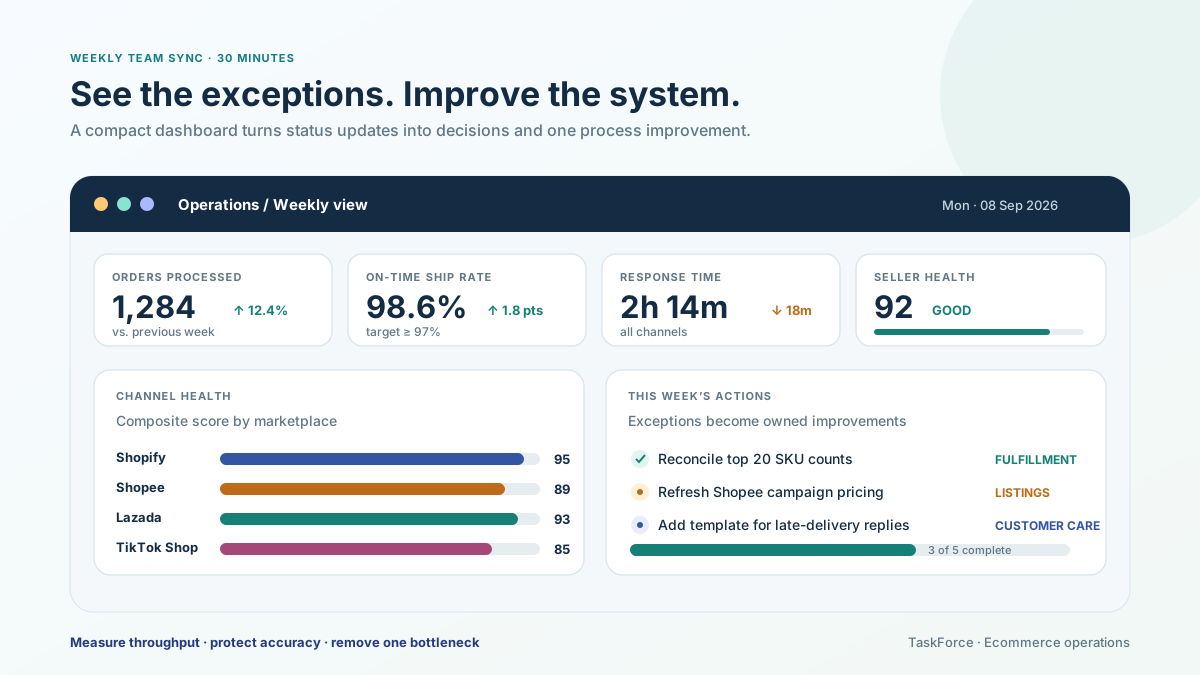
Weekly Team Sync (30 minutes)
One meeting per week. Not a status update — those should be visible in your tools. The weekly sync covers:
- Blockers — what's preventing someone from hitting targets?
- Cross-function coordination — upcoming campaigns, new products, process changes
- Metrics review — are we trending in the right direction on error rates, fulfillment speed, and seller health?
- Improvement ideas — one small process improvement to implement this week
Keep it tight. If it's running over 30 minutes, you're discussing operational details that belong in 1:1 conversations or async messages.
How Do You Reduce Errors Without Slowing Down?
Checklists, verification steps, and guardrails at critical points catch errors before they reach customers. The time invested in prevention is always less than the time spent fixing mistakes.
Errors are the hidden productivity killer. A wrong shipment costs:
- Warehouse time to process the return
- Customer service time to handle the complaint
- Shipping cost for the return and replacement
- Potential seller score impact
- Customer trust damage
The most effective error prevention methods for ecommerce operations:
1. Scan verification at pack station. Every item gets scanned before packing. The system confirms it matches the order. This alone reduces wrong-item shipments by 95%.
2. Pricing change approval. Any price change exceeding 15% from the current price requires a second person to verify. This catches decimal errors ($2.99 instead of $29.90) before they go live.
3. Listing launch checklist. Before any new listing goes live: images verified, price confirmed, inventory linked, description proofread, shipping settings correct. Five checkpoints, two minutes, prevents hours of cleanup.
4. Daily inventory reconciliation. Compare system counts to actual stock for your top 20 SKUs (which typically represent 80% of revenue). Catch discrepancies before they cause overselling.
5. Customer service templates. Pre-written responses for the 10 most common inquiries. Reduces response time and ensures consistent, accurate information.
Building an ecommerce operations playbook covers how to formalize these prevention mechanisms into your team's daily workflow.
How Do You Onboard New Team Members Without Losing Momentum?
A structured onboarding process with documented SOPs, shadowing periods, and graduated responsibility lets new team members become productive in 2 weeks instead of 2 months.
Ecommerce teams often avoid hiring because onboarding feels like it takes longer than just doing the work yourself. This is true only when there's no onboarding structure.
Week 1: Learn
- Day 1-2: Company overview, product knowledge, channel tour (log into each marketplace, understand the seller center)
- Day 3-4: Shadow each role for half a day. Watch how orders are processed, how customer messages are handled, how listings are managed
- Day 5: Read all SOPs. Take the quiz (yes, write a quiz — 20 questions about your most common processes)
Week 2: Practice
- Day 6-7: Handle tasks under supervision. Process orders while someone watches. Respond to customer messages (draft first, senior team member approves)
- Day 8-9: Independent work on low-risk tasks. Simple customer responses, standard order processing
- Day 10: First solo shift. Senior team member available for questions but not actively supervising
Week 3-4: Full Ramp
- Gradually increase responsibility and task volume
- Daily check-in (10 minutes) to address questions and correct any process deviations
- By end of Week 4, the new team member should be handling their full daily workload
The entire onboarding process depends on having documented SOPs. Without them, onboarding is just "watch me and try to remember" — which is how institutional knowledge gets lost and errors get introduced.
How Do You Prevent Burnout on a Small Ecommerce Team?
Burnout in ecommerce teams comes from two sources: unstructured work that creates constant context-switching, and the feeling that the workload will never decrease. Fix both with processes and automation.
Small team burnout is real and it has a specific pattern in ecommerce:
- Team member handles more channels/tasks than sustainable
- Quality drops, which leads to more errors, which leads to more time fixing errors, which means less time for proactive work
- Only reactive work gets done, so problems accumulate, which causes more firefighting
- Team member burns out or quits, and the remaining team absorbs their work, which accelerates the cycle
Breaking this cycle requires:
Time boundaries. Operations work expands to fill all available time. Set hard start and end times. Marketplace chat messages received after 6 PM get answered at 9 AM. Orders placed after the shipping cutoff ship tomorrow. These boundaries exist in every marketplace's SLA — build your team's schedule around them.
Rotation for high-stress tasks. Customer service dispute handling and peak-season fulfillment are the most draining tasks. Rotate them weekly so no single person absorbs all the emotional and cognitive load.
Visible progress. Burnout worsens when the workload feels infinite. Daily checklists with completion tracking show team members exactly what "done for the day" looks like. When the checklist is complete, the day is done.
Automation investment. Every manual task you automate gives your team capacity back permanently. Even automating one 30-minute daily task frees 10+ hours per month. Over a year, that's 120 hours — three full work weeks returned to your team.
According to Gallup's research on workplace burnout, the top causes are unmanageable workload and unclear communication about role expectations. Both are solvable with the structures described above. Harvard Business Review's coverage of operational team management reinforces that process clarity, not motivational perks, drives sustainable team performance.
Frequently Asked Questions
How many people do I need to run multi-channel ecommerce?
For 2-3 channels at 50-200 orders/day, a team of 3-4 dedicated to operations is typical. For 4+ channels at 200+ orders/day, you'll need 5-8. These numbers assume good tools and processes. Without them, double the headcount and expect worse results.
What's the single biggest productivity improvement for ecommerce teams?
Inventory sync automation. Manual inventory reconciliation across channels is the most time-consuming, error-prone, and anxiety-inducing task in multi-channel ecommerce. Automating it saves 1-3 hours per day and eliminates the overselling incidents that consume even more time to resolve.
Should I hire generalists or specialists for my ecommerce team?
Generalists until you hit 5-6 team members, then start specializing. A three-person team needs people who can handle multiple functions across all channels. Once you have enough people to dedicate someone full-time to fulfillment, full-time to customer service, and full-time to listings, specialization improves both speed and quality.
How do I measure individual team productivity without creating toxic competition?
Track team metrics, not individual rankings. The team's fulfillment speed, error rate, and response time matter more than who processed the most orders. Where individual measurement is needed, focus on quality metrics (error rate per person) rather than volume metrics (orders per person), because volume-based tracking incentivizes cutting corners.
What's the best way to handle team communication across channels?
Use one tool for internal communication (Slack, Teams, or even a WhatsApp group) and keep marketplace-specific communication in each platform's native tools. Don't try to centralize marketplace customer chats into Slack — it adds a layer of complexity without reducing the work. Do centralize internal handoffs: "Shopee order #12345 needs a replacement shipment, inventory already adjusted."
Keep Reading
- What Is Ecommerce Operations? — The operational framework your team is executing
- Building an Ecommerce Operations Playbook — Document the processes that keep your team productive
- Ecommerce Automation Guide — Automate the manual work that's slowing your team down
Find out what your operation is missing
Answer 10 questions. Get your ops score. Takes 2 minutes.
Take the Scorecard